

As an administrator, you use the Service Discovery Policy Editor to create an unmanaged relationship policy. An unmanaged relationship is a relationship that exists between two CIs in the CA Catalyst Persistent Store but is not reflected in a CA SOI service model. The unmanaged relationship policy discovers and evaluates unmanaged relationships based on the filtering criteria and whether a source CI is part of a specific or any service. If the filtering criteria match exists, the policy creates a same, but managed, relationship. The newly created managed relationship has the same source and target CIs. This relationship is scoped to all services the source CI is part of. The semantic of the new relationship can be same or different from the original unmanaged relationship depending on the policy definition.
Note: If the source CI is part of multiple services, the policy creates as many relationships between source and target CIs, with each relationship assigned to the appropriate service.
Note: Service Discovery policies support only USM-Core CIs.
Use this scenario to guide you through the process:
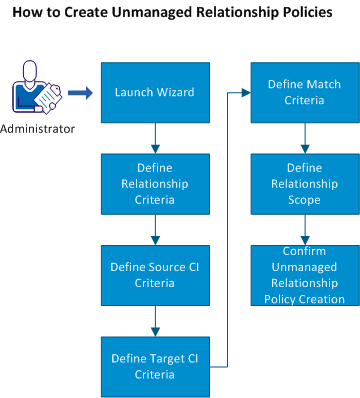
You can also read a scenario that provides an example for creating unmanaged relationship policies.
|
Copyright © 2013 CA.
All rights reserved.
|
|