

As an administrator, you build service models in CA SOI. Building service models is a multi-tiered process that lets you define the associated CIs, relationships, and propagation policies, and optional service-level agreements and escalation policies. You can add any CI that an integrated product manages to a service in CA SOI. You can also set the granularity level, which determines whether CA SOI aggregates alerts from child CIs not included in the model.
Use this scenario to guide you through the process:
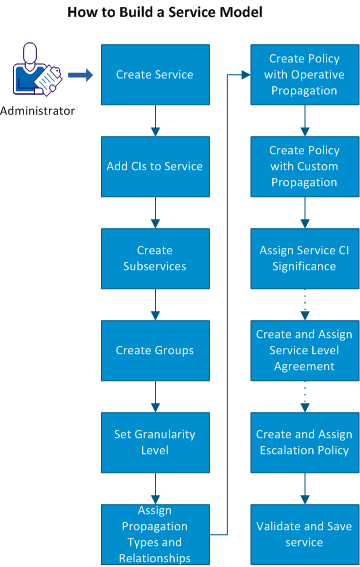
Note: Subservices and groups act together to deliver specific aspects of the service.
Note: You can perform several operations while modeling a service to customize the service display. For more information about these operations, see Customizing Service Model Display. You can also associate services with customers to determine how services impact the associated customers. For more information about customers, see the Administration Guide and the Customer-centric View of Services section.
|
Copyright © 2013 CA.
All rights reserved.
|
|