

You have several architectural options for a high availability implementation. The diagrams in this topic show common configurations.
SA Store database, SA Manager, and UI Server
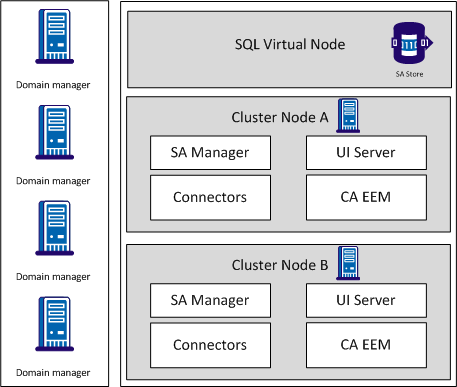
Note that in this configuration, the clustered components use a single virtual Microsoft SQL Server node within the cluster for the SA Store database. All CA SOI components are installed on a single cluster node and fail over to a secondary single cluster node. The connectors installed on the SA Manager and CA EEM are also replicated across nodes.
SA Manager, UI Server, and remote SA Store database
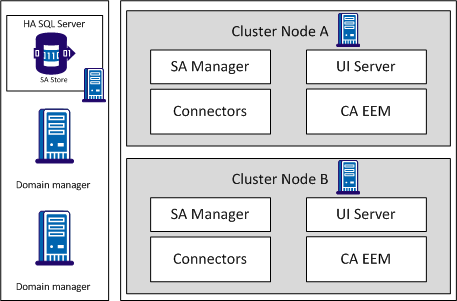
In this configuration, the SA Manager and UI Server on both cluster nodes report to a remote highly available database. If the remote database is not available, alerts are not created and the user interface cannot make updates such as clearing alerts. Therefore, we recommend that the SA Store database is local to the SA Manager when possible.
Multi-server HA Deployment
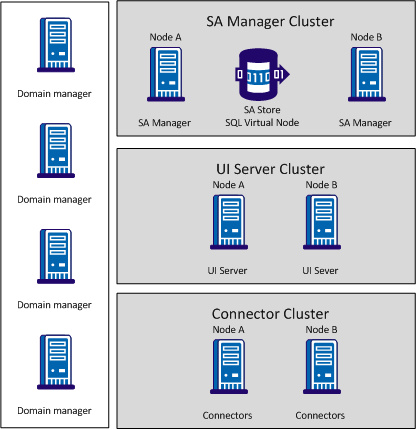
This configuration represents a typical CA SOI deployment with components installed on multiple servers. To implement a multi-server HA deployment, you must deploy each component on cluster nodes in separate clusters. This example uses a SQL virtual node on the SA Manager cluster for the SA Store database. CA EEM is not pictured but can be installed with the SA Manager or remotely. Depending on the number of connectors and their installation requirements, multiple connector servers on multiple clusters could be necessary.
Domain Manager and Connectors
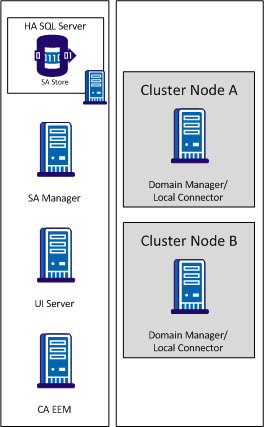
The domain manager is clustered in this configuration, so the associated connector is required on both cluster nodes. The connectors can report to the highly available SA Manager.
|
Copyright © 2013 CA.
All rights reserved.
|
|