Previous Topic: Import UsersNext Topic: Create User Groups


Create Users

You can create users directly in CA EEM for use in CA SOI. Later, you add these users to user groups in CA SOI

Follow these steps:
  1. Select the Manage Identities tab.
  2. Select Users from the submenu.
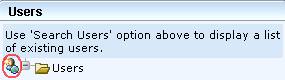
  3. Click the New User icon in the Users pane (lower left):

    This illustration shows the Users pane of the EEM interface with the New User icon circled.

    Note: When this icon is not visible, it means that users are being imported from external sources, such as Active Directory.

  4. Complete the user details in the New User pane and click Save in the New User pane on the right side. At a minimum, enter a Name (alphanumeric characters only) and a Password for the user.

    A message at the top of the User panel confirms that the user was created.

  5. Repeat Steps 3 - 4 for each new user.

    The users are created.

You can now add created users to groups and configure access privileges in CA SOI.