

As an administrator, you manage users and user access privileges to services, alert queues, customers, and CA SOI features.
CA SOI integrates with CA EEM to manage the user authentication and configure the resource access. CA SOI adds users that are defined in CA EEM to product-specific user groups with configurable privileges and access levels.
The access privileges determine the features user group can access: CA SOI features, services, customers, and alert queues. For example, a person responsible for monitoring the Payroll Service may need to view or access only HR-related services. Likewise, if CA SOI is monitoring services for several internal or external customers, each customer should have access to their own information only.
Note: For more information about installing CA EEM to integrate with CA SOI, see the Implementation Guide. For more information about the CA EEM functionality, see the CA EEM documentation. The documentation is provided on the CA SOI bookshelf.
You create and use different administrative users to manage the product. The only user that is defined in CA SOI before you configure the role-based security is the user that was created during the installation ("samuser" by default). The samuser is a super user with all privileges. Use samuser for the initial login and to configure user access. You can also use samuser if CA EEM connectivity is lost. Otherwise, you create and use a different administrative user for managing the product. The samuser has limitations that prevent it from being a long-term management solution, including the following limitations:
For non-administrator user groups, you manage the user group access to services, alert queues, and customers.
Use this scenario to guide you through the process:
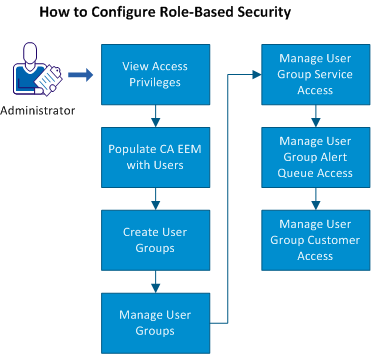
|
Copyright © 2013 CA.
All rights reserved.
|
|