

As an administrator, you can synchronize the Cleared and Acknowledged alert properties from CA SOI to the following products and releases:
The domain manager sends an alert to CA SOI; once a user clears or acknowledges the alert in CA SOI, the update propagates to the domain manager.
Unlike other synchronizations where CIs are correlated across all domain managers, CA SOI alerts are correlated in pairs with the domain manager that initiated the alert (CA SOI and CA Spectrum, CA SOI and Microsoft SCOM, or CA SOI and CA NSM).
All reconciliation formulas are supported, but only SingleSourceOfTruth and LastUpdateWinsFormula (the default formula) are certified.
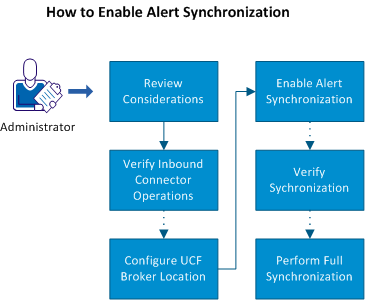
Use this scenario to guide you through the process:
|
Copyright © 2013 CA.
All rights reserved.
|
|