

|
|
|
Data grid lists let you view the contents of a product page on a list form without opening a new page. This data-bound control lists items from the data source in a table so you can select items, sort items, and fetch data.
Example: Expand and Collapse Incident Details on the Incident List Form
The Incident folder expands to reveal nested folders for Assigned and Unassigned incidents.
The folder expands to reveal a nested folder for All, and folders for Incidents grouped by priority level.
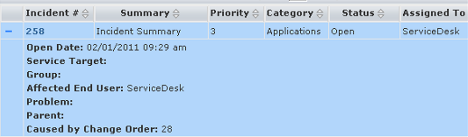
The primary Incident details appear in a single row, as shown in the following example:

The data grid list expands to display the Incident details, as shown in the following example:
| Copyright © 2012 CA. All rights reserved. |
|