

Using Content Packs › Content Packs › Using Content Packs
Using Content Packs
This section describes the procedures involved in using the content packs.
The following diagram illustrates the high-level process to use the content packs:
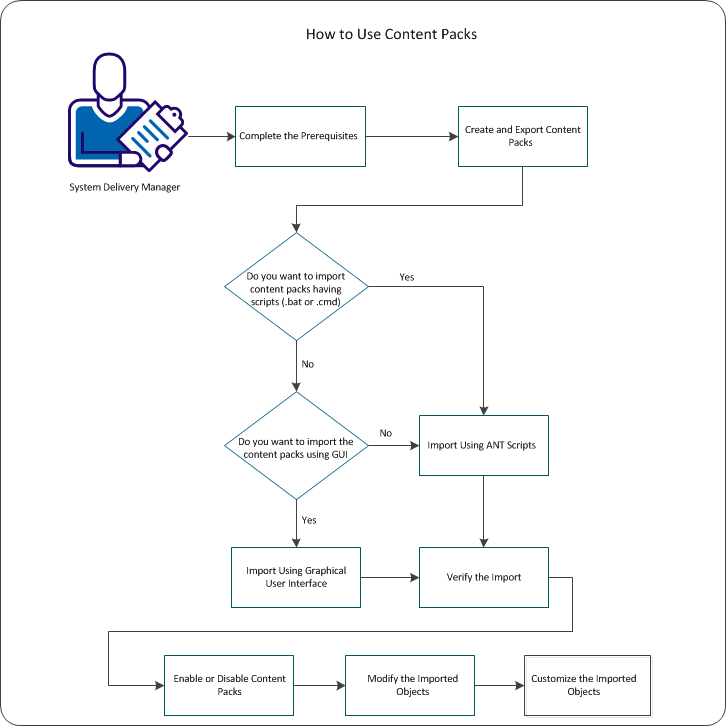
To manage the content packs, perform the following tasks:
- Complete the prerequisites, and test all content that you want to export, to verify that it works correctly (without errors).
- Create and export the content pack from an existing computer.
- Import content packs
- Verify if the import of the content packs was successful.
- Enable or the disable content packs in a business unit. If necessary, you can disable the content pack.
Note: If you copy and customize an object from a content pack, the customized object is not affected by disabling or enabling the content pack.
- Modify the imported objects. If applicable, set the permissions or perform limited editing on the objects.
Customize the imported objects.
Using content packs enables you to do both of the following tasks:
- As a producer or designer of content packs you package a library of objects including your updates and customizations in a single location.
- As a consumer or adopter of content packs, you import the customized objects programmatically in a single operation, as many times as necessary.
You do not have to repeat individual operations for each object type. Content packs provide an efficient method of packaging and applying such updates and customizations, especially when you move from one implementation to another, for example:
- Test-to-production migrations and other same-release migrations
- Replacement of a decommissioned computer
- Restoration of CA Service Catalog customizations after upgrades
Copyright © 2013 CA.
All rights reserved.
|
|