

Clustering › How to Set Up Load Balancing › How to Verify Load Balancing
How to Verify Load Balancing
Verify your load balancing setup to help ensure that it runs efficiently. To verify your load balancing setup, follow this process:
- Sanity test the implementation, as follows:
- To test failover functionality, verify that the load is distributed to other nodes when one of the nodes in the same cluster shuts down.
- To test load balancing, verify that the load is distributed to other nodes when one of the nodes in the same cluster becomes busy.
- If you add or delete clusters after your initial setup, use the previous steps as a model to do the following: Update the workers.properties files to add the new cluster or remove the deleted cluster.
- We recommend that you cluster your load balancer computers to help avoid single-point-of-failure problems with an individual load balancer computer. For instructions, see the Apache website, www.apache.org, and other resources with expertise in clustering load balancer computers.
- Verify that all clustered nodes for CA Service Catalog and CA Workflow communicate efficiently with all load balancer computers using the telnet utility.
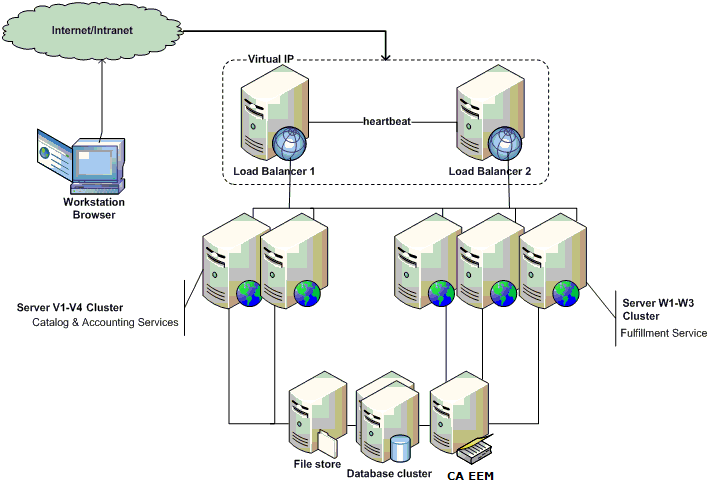
- If clusters do not run efficiently, verify that this communication exists and check for any network configuration problems. For example, in the following diagram, all the computers V1-V4 and W1-W3 clusters must be able to run the “telnet loadbalancer portno” command.
For example, suppose your load balancer host name is abc and the port is 89. In that case, verify that you can successfully connect from all your clustered nodes. To do so, enter the following command from each node:
telnet abc 89
Copyright © 2013 CA.
All rights reserved.
|
|