

Service Design Managers can specify localization attributes to make a single service available in multiple languages. The service appears in the catalog with localized names, descriptions, forms, and so forth. This feature lets a multilingual organization maintain one service in a single catalog for all supported languages. Multiple versions of a service or multiple catalogs are not required. When users access the catalog using a browser set to the local language, they see most elements of the service in the local language.
For efficiency, localize your custom services only. CA Service Catalog automatically localizes the predefined services when you install a language pack for a localized language. For example, consider the predefined services that appear in English when you install CA Service Catalog. After you install the French language pack, these predefined services appear in the catalog in French if you set your browser language to French.
Note: To localize multiple services, see the Localize Multiple Services scenario. This scenario appears in the Administration Guide and on http://ca.com/support.
Note: Service Design Managers typically have one or more of the following roles in CA Service Catalog: Service Delivery Administrator, Services Manager, Super Business Unit Administrator, and Catalog Administrator.
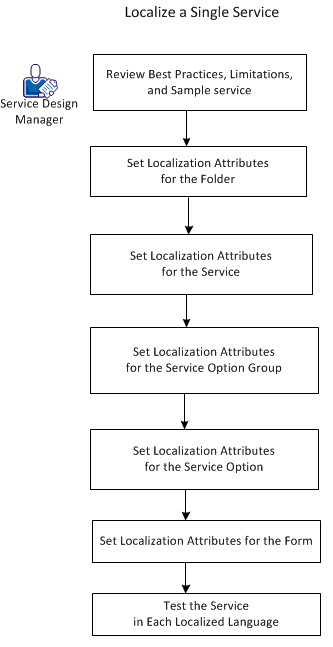
To localize a single service, follow this process:
The following best practices apply when you localize a single service:
Note: For details about defining services, see the Administration Guide.
The following limitations apply when you localize a single service:
|
Copyright © 2013 CA.
All rights reserved.
|
|