

|
|
|
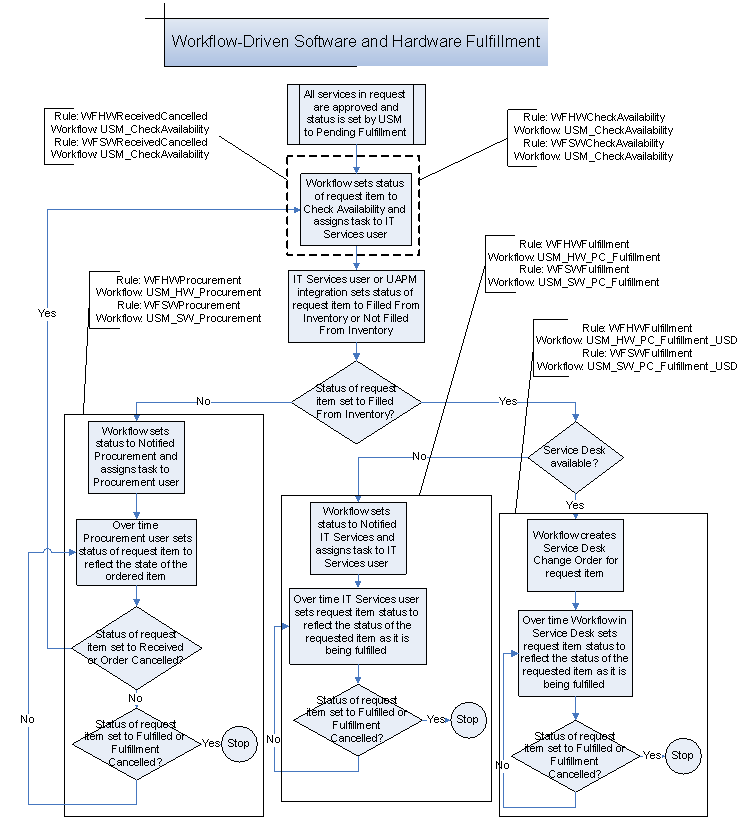
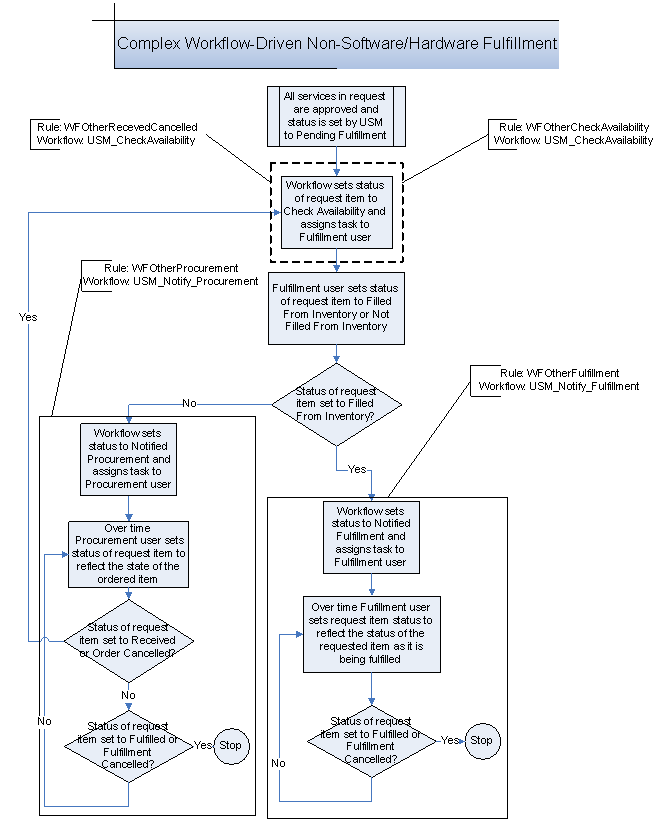
The first step of the fulfillment phase for this fulfillment model is for the appropriate department to check the availability of the requested item. For hardware and software this might be the IT Services department. For other categories, the department may be different.
For hardware and software items, if the requested item is found in available inventory, then there are two possible paths to follow. If CA Service Desk Manager is available, then a CA Service Desk Manager change order is opened. If it is not available, then the IT Services department is notified to fulfill the request.
For non-hardware and software items, if the requested item is found in available inventory, then the appropriate department is notified to fulfill the request.
If the requested item is not found in available inventory, then the Procurement department is notified that the requested item needs to be purchased. After the status of the requested item is set to Received, it is assumed that the item is then in available inventory and the appropriate department is to check the inventory as before.
If a CA Service Desk Manager change order is created, an associated CA Service Desk Manager CA Workflow process definition is launched to manage the rest of the fulfillment process. After the change order is closed, the associated process instance sets the request item status to Fulfilled. If the IT Services department or other appropriate department is notified that fulfillment is needed, the user assigned the fulfillment task sets the request item status to Fulfilled. When all request item statuses are set to Fulfilled, the system changes their statuses to Completed, as appropriate. This allows billing from Accounting Component.
If for some reason, the requested item cannot be fulfilled, then the status is set to Fulfillment Cancelled, which the system changes to Cancelled when all of the request item statuses are set to Fulfilled or Fulfillment Cancelled, marking the end of the fulfillment phase.
Note: The following graphics use the former names of several rules, as listed in Summary of Approval and Fulfillment Rules and Name Changes. If you have already started using the new rules, note that they are represented in the following graphics by their former names.
The following is the flow for hardware and software items:
The following is the flow for non-hardware and software items:
| Copyright © 2013 CA. All rights reserved. |
|