Integrating with External Reservation Services › Set Up Reservation Services
Set Up Reservation Services
This scenario explains how a service delivery manager sets up basic end-to-end reservation services. Basic end-to-end reservation services enable users to reserve computers (or other resources) and to modify, extend, and return early reservations that are in progress. This scenario is for integrating CA Service Catalog with an external (third-party) reservation product.
In this scenario, you design services to address the following use case. Use these specifications as a model and adjust them to match your implementation.
- A managed service provider offers reservations of on demand virtual machines to its customers (users). The managed service provider is using CA Service Catalog with an external reservation product.
- Customers can do the following:
- Reserve a virtual machine with preconfigured resources, for example, 2 GB of memory (RAM) and 50 GB of disk space. The customer specifies the length of time for reservation, for example, 15 days.
- Modify the preconfigured resources, for example, to add additional memory or disk space.
- Extend the length of the reservation, for example, to add five more days.
- Return the reservation early, for example, to account for an unexpected event such as a cancellation.
The Catalog system includes each of these options as a service, for example, a reservation service, an extend reservation service, and so forth. All services run at the same time.
- The total billing includes the charge or credit for each service. This scenario uses periodic (monthly) billing.
- The cost of the service follows:
- The basic cost is $1 per virtual machine per day. This cost includes a basic system environment: a Windows operating system with 1 GB of memory and 50 GB of disk space.
- Users can request more memory or disk space for an additional charge. For example, each extra 0.25 GB of memory costs an additional $3 per day.
- If a user returns the virtual machine or some resources (such as extra memory) early, then the account is credited for the unused portion.
 I
I
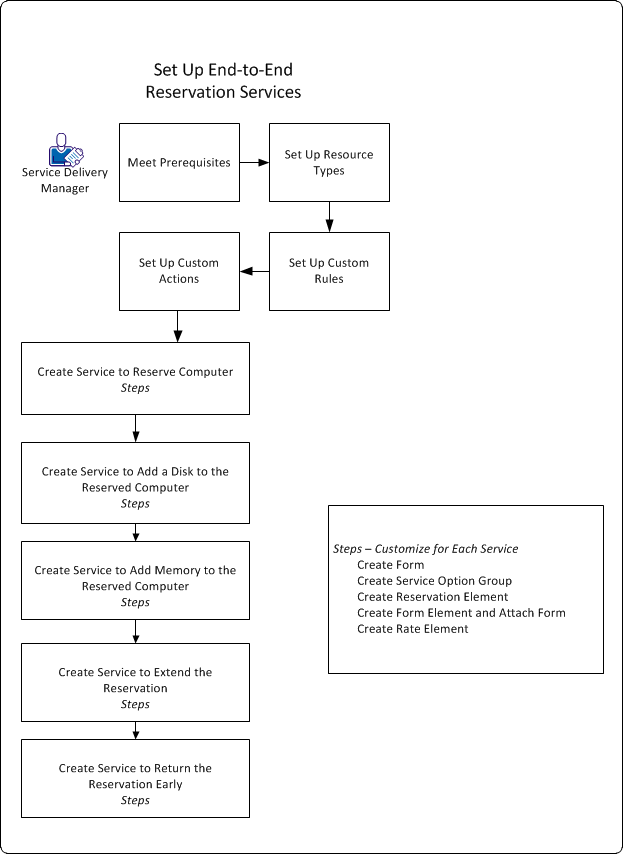
To set up basic end-to-end reservation services for this scenario, follow this process:
- Meet the prerequisites:
- Set up your third-party reservation product and follow its instructions for integrating with other products such as CA Service Catalog.
Note: This scenario is designed for use with an External Reservation System, not Reservation Manager. If you are using Reservation Manager, consider using the predefined services in the Reservation Services folder. The services in that folder are designed for use with Reservation Manager and were included with the previous release of the CA Service Catalog. For details about those services, see the "Integrating with Reservation Manager" chapter. Those services do not include the new features (the resource types and enhanced modify, extend, and return operations) described in this scenario. However, you can use this scenario as a model to create or update services that integrate with Reservation Manager to include these new features.
- Be a proficient user of the Service Builder. Be able to create and configure services, service option groups, and, service option elements.
- Be a proficient user of the Form Designer. Be able to create and configure forms. Be able to create JavaScript functions for use in form fields.
- Verify that CA Service Catalog and CA Process Automation are installed and configured. This scenario uses CA Process Automation.
- Be able to create and configure business processes in CA Process Automation to meet the needs of your implementation. CA Service Catalog does not provide the CA Process Automation processes for this scenario. You can create these processes, or you can copy and modify existing processes, for example, processes supplied by another CA Technologies product or solution.
- Set up the resource types that you need, to match the resources in the reservation system that you are using.
- Set up the custom rules and actions required for the end-to-end reservation services to function correctly.
- Create the service for reserving a computer.
- Create the service for adding a disk to the existing reservation.
- Create the service for adding memory to the existing reservation.
- Create the service for extending the existing reservation.
- Create the service for returning selected resources or the entire reservation early.
- Make the services available and test them by requesting them.

