

|
|
|
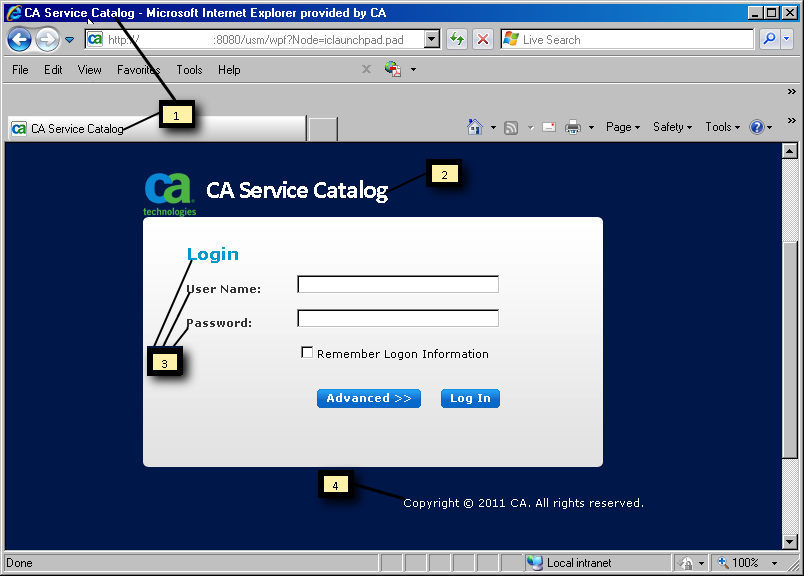
The following table lists the elements of the login page that you are most likely to customize, except for the login logo. When applicable, each row lists the section of the login.css file that affects the look-and-feel of the element. Callout numbers identify these elements in the sample page that appears after the table.
|
Callout Number |
GUI Element |
File Location under |
Section in |
|
1 |
Text for browser window title and title bar |
view\webapps\usm\locale\icusen\logon.xml |
.loginpage |
|
2 |
Text for product name |
view\webapps\usm\locale\icusen\logon.xml |
.loginproductname |
|
3 |
Login input text |
view\webapps\usm\locale\icusen\logon.xml Note: This text supplies the User Name, Password, and Advanced-Business Unit fields. |
logininputtext |
|
4 |
Copyright text and date |
view\webapps\usm\locale\icusen\logon.xml |
.loginpagecopyright |
In addition, the favorites icon appears in the browser address bar and the product title bar of every product page, including the login page. The favorites icon is a global page element that you can customize.
Note: For the Text elements, the File Name column displays the folder location for an English system (icusen). For other languages, the location is different.
Each element in the following picture matches a callout item from the preceding table. You can optionally customize the item by replacing or editing the corresponding file. Your browser page can look different from the following example.
| Copyright © 2011 CA. All rights reserved. | Tell Technical Publications how we can improve this information |