

Using CA SYSVIEW Objects › Object and Line Actions › Use Line Actions to Affect Rows and Fields
Use Line Actions to Affect Rows and Fields
Line Actions are equivalent to CA SYSVIEW line commands. You can execute line actions by selecting lines in the table, and then selecting the action you want to perform in the Action menu.
Line actions let you do the following:
- Initiate an action on a specific row or set of rows, like to cancel a job
- Alter fields, the same as typing over a value in CA SYSVIEW on z/OS
Follow these steps:
- Select the rows you want to change and right-click.
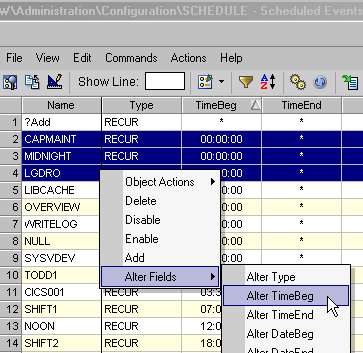
The Actions drop-down list displays the available line actions and, if available, the alter field line actions that you can perform on the selected rows.
- Click the action you want to perform on the lines that you selected.
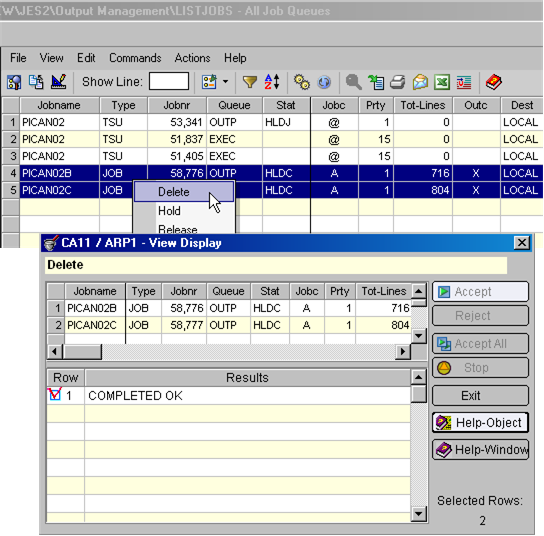
The dialog displays where you can accept, stop, exit, or access online help.
- Click Accept All
The action processes, the dialog refreshes, and the results display.
Examples: Line Actions Dialog and Alter Field
- The following example shows using line actions to delete lines in the object.
- The following example shows the Alter Fields drop-down menu selections. These selections let you select a field and change its value, like Alter TimeBeg to change the begin time, for the selected row or rows.
Copyright © 2013 CA.
All rights reserved.
|
|