

This section contains the following topics:
Federation Partnership Overview
Considerations for the Asserting Party Configuration
How to Configure the Relying Party in a Federation Partnership
User Identification Based on an Assertion Attribute
SAP Web AS User Identification
SSO Configuration for Federation Mode
Single Logout Configuration for Federation Mode
Identity Cookie Settings for Federation Mode
Assertion Attribute Use by the Target SAP Application
This section describes the configuration of this product for use with CA Federation. We assume that you are familiar with federation concepts and terminology. For more information about federation, see the product documentation that ships with your version of CA Federation.
The main purpose of CA Federation is to establish a partnership between two organizations so they can share user identity information and attributes to facilitate single sign-on. A CA Federation partnership consists of two entities at two different sites—one local and one remote. Either entity can assume the role of the asserting party, the side that creates the assertion or the relying party, the side that uses the identity information in the assertion.
If CA Federation is deployed at both sites, each site must define a partnership. Therefore, for each local asserting party-to-relying party partnership at one site, there has to be a reciprocal local relying party-to-asserting party partnership at the corresponding site. These two definitions define a single partnership. For example, Site A is the local SAML 2.0 IdP and has specified a partnership with Site B as the remote SAML 2.0 SP. Site B is the local SAML 2.0 SP and has specified a partnership with Site A as its remote SAML 2.0 IdP.
In the following network, CA Federation is deployed only at the relying party where the Agent for SAP and SAP Web AS J2EE server reside so you only need one partnership definition. Configure CA Federation as the local relying party and the partner providing the assertion as the remote asserting party. For SAML 2.0, for example, the relying party is the local SP while the asserting party is the remote IdP.
The following figure shows the sides of a federated partnership.
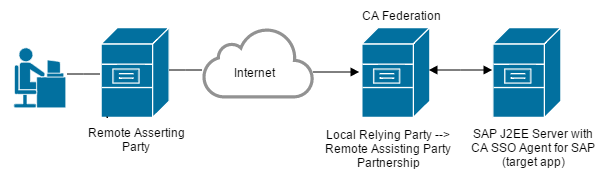
Note: A relying party can establish partnerships with more than one asserting party.
The deployment in this chapter shows the asserting party at the remote side of the federated partnership. CA Federation and this product are at the local relying party side of the partnership. This chapter does not assume that CA Federation is at the asserting party; a third-party product can generate assertions. Therefore, detailed configuration procedures for the asserting party are beyond the scope of this chapter.
The following considerations apply for asserting party configuration:
Configure the federation product at the asserting party to generate assertions. An assertion can include attributes that the target SAP application at the relying party uses for customization. If CA Federation is at both sides of the partnership, see the CA Federation Manager Guide for instructions on configuring the asserting party.
An administrator at the asserting party can enable single logout (SLO) as a SAML 2.0 feature. Single logout results in the simultaneous end of all federated user sessions that are associated with the browser that initiated the logout. The asserting or the relying party can initiate single logout, and the single logout configuration settings are the same at both sides.
At the asserting party, the single logout configuration can use a logout confirmation page. The asserting party redirects the user to this page when the single logout process is complete. A URL identifies the logout page.
When communicating with the Agent for SAP at the relying party, enter the URL of the SAP Web AS logout page as the logout confirmation page. When CA Federation initiates single logout, it directs the user to its single logout URL, and it terminates the CA Federation user session. After terminating the CA Federation session, CA Federation redirects the user to the logout URL. When the logout URL is set to the SAP Web AS logout URL, this logout page invalidates the SAP Web AS session.
If your local site initiates single logout, the logout URL must be accessible to the local site. The logout URL must also be a local resource and not a resource in a federated partner domain. For example, if the local domain is acme.com and your partner is example.com, then the single logout confirmation URL must be in acme.com.
Use the CA Federation user interface to configure partnerships. The following process establishes a CA Federation partnership. Some of the steps in this process require specific settings for this product. For the settings relevant to the Agent for SAP, more detailed configuration instructions follow this general process.
To learn more about CA Federation and partnership creation, see the CA Federation product documentation.
Important! Configure this product in Federation mode to operate with CA Federation.
The deployment in this chapter has CA Federation and the CA SSO Agent for SAP at the relying party. Therefore, the following configuration process is only for the relying party. The administrator at the remote asserting party must configure that party properly for federated communication. Although the asserting party configuration process is beyond the scope of this chapter, there are configuration issues to consider.
Follow these steps:
In this partnership, this product is the local relying party and the partner is the remote asserting party. The CA Federation UI provides an entity wizard to guide you through this process.
This product is the local relying party, so you must create, for example, a SAML2 SP ->Idp partnership.
Configure the following partnership details:
The user identification step is where you specify the identity of the user on the SAP Web AS.
The single sign-on configuration is where you define whether the assertion is passed using HTTP-Artifact or POST as the single sign-on profile. You also define the target resource that the user wants to access.
Enables the simultaneous end-of-user sessions within the browser that initiated the session.
The Agent needs its FEDZone and FEDPassword settings to match the cookie zone and password settings for CA Federation. The values must be shared during an out-of-band communication.
The User Identification step lets you specify what identity attribute in the assertion the relying party uses to find users in its user store. Locating the user in the user directory is the process of disambiguation.
For this product, the user identity is that of the user on the SAP Web AS system. This user identity is the one you want to assert to the SAP Web AS.
Select one of the following methods for the user identification process:
Instructs the relying party to use the value of the NameID element in the assertion to locate the correct user record.
Instructs the relying party to use the value of a specific attribute from the assertion. This option tells the relying party to use attributes from the assertion to locate the correct user record. These attributes are defined at the asserting party and included in the assertion. The relying party must know what attributes the asserting party is going to send in assertion. You can use this option, for example, if the Name ID is transient and changes regularly.
Select a predefined attribute from the drop-down list or enter an attribute directly in the text box. This list is populated if the remote asserting entity was created based on metadata that contained attributes.
Instructs the relying party to use information from the assertion that the Xpath search string defines. For example, you can configure the relying party to look for the entityID and use that attribute to locate a user record. After you determine which attribute is extracted from the assertion, include the attribute in a search specification thatCA Federation uses to locate a user in the user store.
After a successful disambiguation process, CA Federation generates a session for the user.
After disambiguation, CA Federation must pass one attribute from the user directory record to the SAP Web AS. This attribute identifies a valid SAP Web AS user. CA Federation passes this attribute in an identity cookie, named the FEDPROFILE cookie. Configure which attribute from the user directory record that CA Federation uses according to the information in SAP Web AS User Identification.
After disambiguation, CA Federation asserts one attribute from the user directory record to the SAP Web AS as a valid SAP Web AS user. CA Federation passes the value of this attribute in an identity cookie, named FEDPROFILE cookie.
The User Directory configuration in the CA Federation UI is where you specify which attribute CA Federation includes in the FEDPROFILE cookie.
In the CA Federation UI, select the User Directory tab and complete the following field for your user directory type:
Specify any user attribute in the user record at the relying party directory that identifies the SAP Web AS user name. The value of the user attribute you select must match the value of the Web AS username in the SAP Web AS user store.
For example, the relying party directory has a user record with an attribute mail=JSmithSAP. If you set the Universal ID to mail, the SAP Web AS user directory must also contain a user name record set to JSmithSAP.
The value of the user attribute gets included in the FEDPROFILE cookie to provide access to the application on the SAP Web AS.
If the Agent for SAP is operating in Federation mode, complete single sign-on configuration for the partnership. To configure single sign-on at the relying party, specify the SAML binding that is supported by the relying party and the related aspects of how the relying party handles single sign-on communication.
Detailed instructions for single sign-on configuration can be found in the CA Federation documentation.
To access the single sign-on dialog, select the SSO and SLO step from the CA Federation UI Partnership Wizard.
When you configure single sign-on, be aware of the following fields:
Be sure to select one or both of the profiles. If you select HTTP-Artifact, also configure the authentication method for the outgoing back channel.
Specifies the target resource URL at the destination site. In standalone federation mode, set the value of this field to the SAP portal or to the web server proxy to the SAP Web AS portal.
(Optional) Replaces the value specified in the Target field with the value of the Relay State query parameter for initiated single sign-on.
This check box gives you more control over the target because using the Relay State query parameter lets you dynamically define the target.
Lists the URLs of the Single Sign-On Services at the remote asserting party. Each entry in the table specifies the location where the AuthnRequest service can redirect an AuthnRequest message.
Note: Some CA Federation configuration settings are in different dialogs depending on the CA Federation version. For the exact location of the configuration settings, see the CA Federation documentation and UI online help for your version of CA Federation.
If the Agent for SAP is operating in Federation mode, we recommend configuring single logout (SLO) as a feature. Single logout results in the simultaneous end of all federated user sessions that are associated with the browser that initiated the logout. Single logout helps ensure that no sessions are left open for unauthorized users to gain access to resources at the relying party. The asserting or the relying party can initiate single logout, and the single logout configuration settings are the same at either side.
For detailed configuration instructions for single logout, see the CA Federation documentation.
To configure single logout between CA Federation and the SAP Web AS server, note the settings of the following SLO fields:
Specifies the URL of the single logout service at the asserting party. This URL is where the relying party sends its SLO request.
Specifies the URL where the user is redirected when the single logout process is complete.
For this product, enter the URL of the SAP Web AS logoff page. The SLO Confirm URL helps ensure that the single logout initiated from CA Federation logs out the user from the CA Federation session. The URL also helps ensure that the associated SAP cookie is invalidated.
This URL must be accessible to the local site if SLO is initiated from your local site. This URL must also be a local resource and not a resource in a federated partner domain. For example, if the local domain is acme.com and your partner is example.com, then the SLO Confirm URL must be in acme.com.
Replaces the URL in the SLO Confirm URL field with the value of the Relay State query parameter in the single logout request.
This check box gives you more control over the single logout confirmation target because using the Relay State query parameter lets you dynamically define the confirmation URL for SLO requests.
Note: Some CA Federation configuration settings are in different dialogs depending on the CA Federation version. For the exact location of the configuration settings, consult the CA Federation documentation and UI online help for your version of CA Federation.
CA Federation supports single sign-on security zones. Single sign-on security zones provide configurable trust relationships between groups of applications within the same cookie domain. Security zone affiliation is reflected in cookie names. For CA Federation, the default identity cookie is named FEDPROFILE. This cookie contains user identity information and user attributes that an application can use to customize the user experience.
At the relying party, CA Federation creates the FEDPROFILE cookie and passes the cookie to the Agent for SAP. The Agent for SAP extracts the required identity information from the cookie to disambiguate a user and permit access to the requested resource.
For the Agent for SAP to access and read the FEDPROFILE cookie, the Agent needs its FEDZone and FEDPassword settings to match the cookie zone and password settings for CA Federation. The values must be shared during an out-of-band communication.
In the CA Federation UI, go to Infrastructure, Deployment Settings to locate the cookie settings.
Review the value of the following fields so you know how to configure the associated Agent for SAP settings:
Specifies the prefix for the cookie zone name. You can set this prefix to any alphabetical value.
Default: FED
At the relying party, the CA Federation Cookie Zone value must match the Agent FEDZone value. The values must be shared during an out-of-band communication. Specify theFEDZone value when running the Agent configuration wizard.
Indicates the encryption password of the FEDPROFILE cookie for the relying party.
If you provide a password for the FEDPROFILE cookie, define the same value for the Agent FedPassword value. The values must be shared during an out-of-band communication. This value cannot be blank. Specify the FEDPassword value when running the Agent configuration wizard.
Confirms the password entry.
For more information about cookie settings, see the CA Federation Manager Guide.
Note: Some CA Federation configuration settings are in different dialogs depending on the CA Federation version. For the exact location of the configuration settings, consult the CA Federation Manager Guide and UI online help for your version of CA Federation.
This product in federation mode can receive an assertion from the remote partner that includes user attributes. The target SAP application can use these assertion attributes to customize the application for each user.
When the SAP Web AS calls the agent to authenticate a user, the server passes a subject to the agent. The agent adds one or more principals to the subject, as follows:
The primary principal is always added to the subject and it represents the user identity.
A user attributes principal is added to the subject only if user attributes are in the FEDPROFILE cookie sent to the agent.
The agent returns the subject back to the SAP Web AS, which passes this subject and the additional principals to the target application.
For the target application to retrieve the principals, add code to the application that extracts the principals. Add the following code to the SAP application to retrieve the principals and then use the attributes in the user attributes principal for customization.
Set setPrincipals = subject.getPrincipals();
Iterator itrPrincipals = setPrincipals.iterator();
java.security.Principal principal;
while (itrPrincipals.hasNext())
{
principal = (java.security.Principal) itrPrincipals.next();
}
The code sample returns the second principal containing the user attributes to the application. The application can then retrieve the attributes using the following call:
Principal.toString()
Add this string call to the application after the previous code.
The result of retrieving the attributes is a comma-separated string of attributes enclosed in curly braces, as follows:
{attr1=val1, attr2=val2}
Finally, the SAP Web AS application parses the string and process the assertion attributes.
Attribute retrieval by the target application is complete.
|
Copyright © 2015 CA Technologies.
All rights reserved.
|
|