

|
|
|
A local system image specifies the operations policies required by your organization for the managed resources on this system. It consists of a system image definition and a number of resource definitions.
The AutoAssist Express Setup Facility helps you set up an initial image for a system.
The facility works in the background. It identifies the currently configured or active resources on a system, and defines these resources to the knowledge base. The definitions are based on predefined resource templates. The templates contain generic operations methods for different types of resources. The supplied knowledge base comes with sample templates. You can modify these templates or define your own templates.
When the initial resource definitions are in the knowledge base, you can modify these definitions to suit special requirements.
Important! If you use the provided JES2 inactivation process, JES2SHUT, for your JES2 subsystem, you should review your CONDEF JES2 initialization statement.
The facility uses a control member to determine the characteristics of the system image. The following control members are provided: $RMEXPR1 for JES2, and $RMEXPR2 (global) and $RMEXPR3 (local) for JES3.
The following illustration shows the initial resource relationships framework set up by the $RMEXPR1 member. The framework used by the other members is similar.
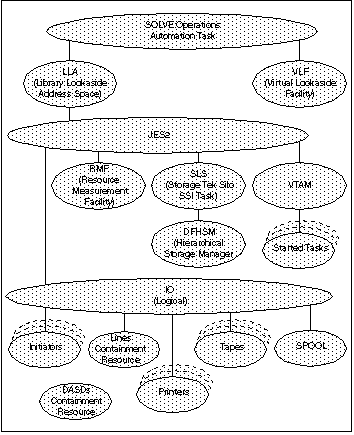
Note: You can use the GRT action code on the System Image List panel to display resource relationships. To access the system image list from any panel, enter /RADMIN.I.L.
| Copyright © 2011 CA. All rights reserved. | Tell Technical Publications how we can improve this information |