

|
|
|
On entry to the security exit, Register 1 points to a list of ten full words, as shown in this diagram.
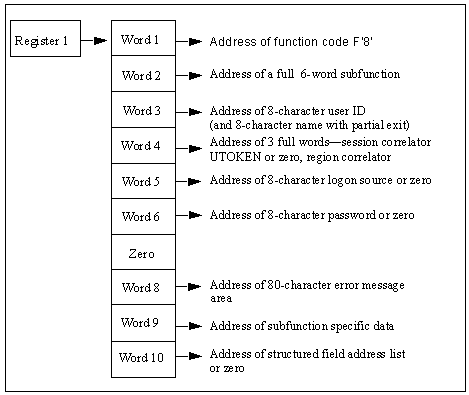
The contents of the parameter list are as follows:
Is a fullword containing the address of function code F‘8’.
Is the address of a subfunction code. This code defines the type of logon request being processed and has values set as follows:
|
Subfunction Code |
Value |
|
F‘0’ |
Logon from native terminal |
|
F‘4’ |
Logon from TSO interface component of EIP |
|
F‘8’ |
Logon from ROF user |
|
F‘12’ |
System console logon |
|
F‘16’ |
System environment logon |
|
F‘20’ |
Reserved |
|
F‘24’ |
Reserved |
|
F‘28’ |
APPC user region logon |
|
F‘32’ |
Reserved |
Is the address of an eight-character field, blank padded, containing the user ID requesting the logon. If a partial security exit is installed then there is an additional, contiguous eight-character field, blank-padded containing the model user ID specified by the SYSPARMS MODLUSER operand. If no model user has been specified this field is set to blanks.
Is the address of two full words:
These values are returned in all subsequent calls to the exit in reference to this user ID session, so that it can be used as a session correlator.
Varies according to subfunction code.
|
Subfunction Code |
Value |
|
F‘0’ |
Word 5 contains the address of an eight-character field, blank-padded, which contains the name of the terminal at which the user wants to logon. |
|
F‘4’ |
Word 5 contains the address of an eight-character field, blank-padded, which contains the name of the VTAM APPL name used by the TSO interface for this session. |
|
F‘8’ |
Word 5 is set to zero. |
|
F‘12’ |
Word 5 contains the address of an eight-character field holding the word CONSOLE, or the generated user ID for multiple console support (OS/VS systems only). |
|
F‘16’ |
Word 5 contains the address of an eight-character field containing the name of the pseudo-terminal with which the system environment logon is associated. |
|
F‘28’ |
Word 5 is set to zero. |
Varies according to subfunction code.
|
Subfunction Code |
Value |
|
F‘0’ |
Word 6 contains the address of an eight-character field, blank-padded, containing the password entered with the user ID. |
|
F‘4’ |
Word 6 is set to zero. |
|
F‘8’ |
Word 6 contains the address of an eight-character field, blank-padded, holding the password entered on a SIGNON command from the remote region. If no password was entered, this word is zero. |
|
F‘12’ |
Word 6 is set to zero. |
|
F‘16’ |
Word 6 is set to zero. |
|
F‘28’ |
Word 6 contains the address of an eight-character field, blank-padded, holding the password specified on the APPC NCL verb that started this region. If no password was entered, this word is zero. |
|
F’36’ |
Web user logon. |
Is set to zero.
Is the address of an 82-character area into which the exit can place any error message text if the logon request is denied. Any text placed in this area is displayed to the user in response to the logon attempt. If an error message is returned in this area it must be formatted as follows:
Specifies the hexadecimal length of the message text (excluding these two bytes).
Specifies the error message text.
Limits: 80 characters
Message text is converted to uppercase.
Varies according to subfunction code.
|
Subfunction Code |
Value |
|
F‘0’ |
Word 9 set to zero. |
|
F‘4’ |
Word 9 set to zero. |
|
F‘8’ |
Address of 12-character area holding the INMC link name of the region from which a ROF logon request has been received. Following this address is a four-character field that is either zero or contains the domain ID of the region from which the SIGNON request originated. Following this field is a one-byte binary field with flag settings as follows:
|
|
F‘12’ |
Word 9 set to zero. |
|
F‘16’ |
Word 9 set to zero. |
|
F‘28’ |
Word 9 set to zero. |
Depends on whether you have a full or partial security system:
Each word in this list contains the address of a structured field defining an item of information for this user ID. Your region processes all these structured fields to determine the privileges and other information to be associated with the user ID.
Each word in the area points to a single structured field, representing one attribute of the current UAMS definition for the user ID pointed to by word 3 of the parameter list.
If the requesting user ID is not defined on UAMS, Word 10 is zero.
The exit must return a completion code in Register 15 on return. Completion codes are supported as described below. Specific causes for logon rejection are identified by error message text returned in the area addressed by word 8 of the Logon Call parameter list.
These return codes are the only codes that are accepted in response to a logon call. Any other return code is treated as indicating that the logon is rejected.
Indicates that logon is accepted without error.
Indicates that logon is accepted but password has expired. Your product region must enforce password renewal before the user has access to any other functions.
Indicates that logon is accepted but this is a new user ID. Your product region must enforce password change before allowing the user access to any other functions.
Is reserved and cannot be used as a return code.
Indicates that logon is rejected. Password is incorrect, but your product region is to allow a retry.
Indicates that logon is rejected. Password is incorrect and no retry is to be permitted. A violation message is logged.
Indicates that logon is rejected. An error message explaining the cause of rejection is available in the 82-character area addressed by word 8 of the parameter list. The format of this area must be a 2-byte length field set to contain the length of the error message text, followed by up to 80 characters of error message text. If the logon was from a TSO user, the error message is not displayed; the normal product region logon panel is presented for entry of user ID and password and the user is not classified as a TSO interface user.
Note: Return codes 16 and 20 are provided to give compatibility with the standard UAMS functions, which provide a maximum number of password retries before rejecting the logon attempt and logging a violation message.
Return codes 4 and 8 provide compatibility with the UAMS convention of enforcing password change at logon time if the user’s password has expired, or for the first logon of a new user ID.
The exit might not be able to determine that a user ID is new, depending upon the information available to it from the external security system in use. If required, the exit can be written to provide two return codes only, 0 or 24, with an appropriate error message if the logon is rejected.
The ability to deny a logon with return code 24 and an error message of the exit’s choice allows the installation to extend the security exit’s function beyond that of simple password validation. For example, the exit might deny logons after a certain time of day or reject ROF logons from certain remote systems.
System console and system environment logon calls take default attributes if the exit causes the logon to fail.
| Copyright © 2012 CA. All rights reserved. |
|