

The Administration Console is shipped with an out-of-the-box administrative user called the Master Administrator who can perform high-level configurations. Other than this role, you must assign users to administrative roles to administer the RiskMinder system or to access your business data. An administrative role typically comprises a set of privileges based on a job function profile and the scope in which these permissions are applicable. The users with administrative privileges are referred to as administrative users.
Note: See "Summary of Administrative Privileges" for a comprehensive list of privileges available.
The Administration Console supports the following pre-defined administrative roles:
In addition, you can also create Custom Roles. RiskMinder is shipped with three pre-defined custom roles that are required for Case Management:
Note: The administrators are also considered as users of the system.
The following figure depicts these administrative roles and the relationships between the privileges available to these roles. The topics following the figure discuss the supported administrator levels in details.
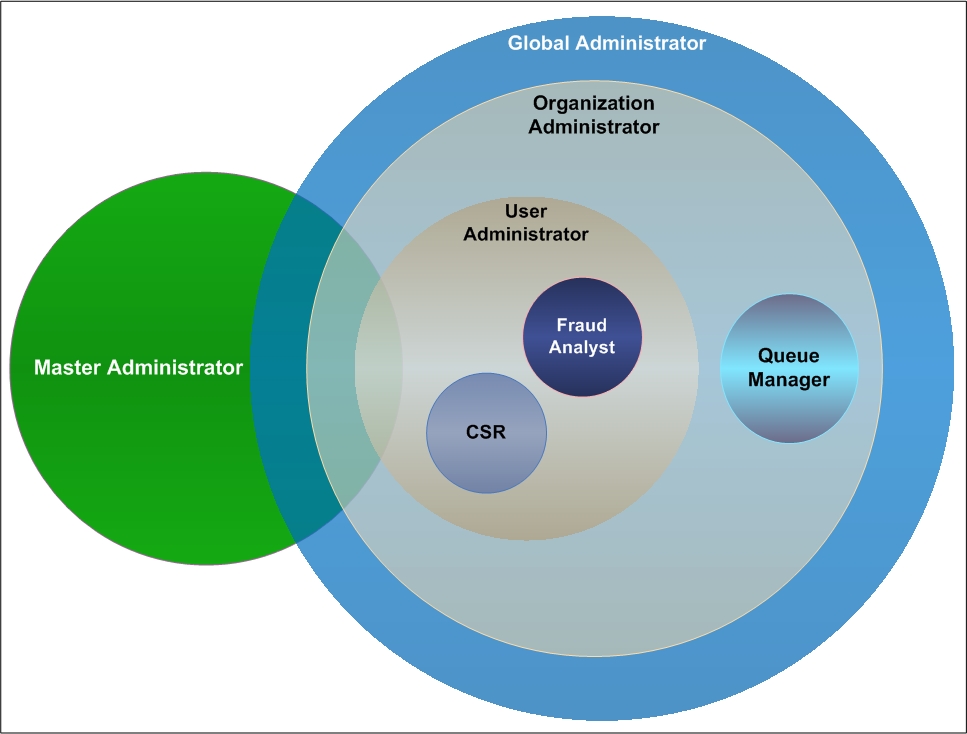
Note: As can be seen in this figure, the hierarchical distribution of privileges does not allow the administrators to access features beyond their fixed boundaries. Each level has a pre-defined privilege or role.
|
Copyright © 2013 CA.
All rights reserved.
|
|