

You can partition automation workload by deploying other Orchestrators. As with Domain Orchestrators, these non-Domain Orchestrators can be clustered.
Consider the case where certain workload must be targeted to execute in a specific datacenter or geographic region and the CA Process Automation system needs to be differently configured in each location. One approach would be to deploy an Orchestrator in each datacenter and use Orchestrator level configuration to override Domain level configuration appropriately.
A standard deployment has one Domain and a single environment, the Default Environment.
You can partition a CA Process Automation domain into multiple environments. Then, various aspects of the Domain configuration can be tailored to each environment. For example, with multiple environments you can configure things one way in a content development context and another way in a testing or production context.
Each environment can have its own Library so you can have potentially different versions of content in the different environments.
Environments also partition workload. Any given Orchestrator is associated to one environment. The Default Environment has the Domain Orchestrator and can have one or more non-Domain Orchestrators. All other environments have one or more non-Domain Orchestrators. Each Domain Orchestrator and each non-Domain Orchestrator can be clustered (multiple nodes) or nonclustered (one node).
Environments can also help you partition workload within a production context. For example, a service provider could deploy one environment per customer. This setup allows running the same standard automation content across multiple environments whose workload is physically partitioned. These environments that are running the same content are configured differently and, potentially, running in different geographic locations.
You have flexibility in how you assign the sharing of data stores across Orchestrators. The typical illustrated associations are:
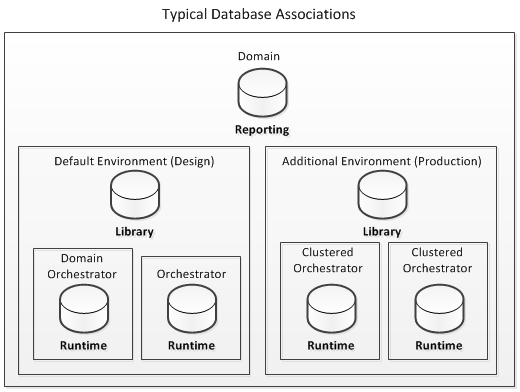
In a simple deployment with a nonclustered Domain Orchestrator in the Default Environment, the three CA Process Automation data stores are installed in one database on one database server.
Adding other environments and installing non-Domain Orchestrators significantly increases the complexity of the data store configuration required.
|
Copyright © 2014 CA.
All rights reserved.
|
|