

After you design and test a new process, you can release the process with the objects it uses. Typically, you release a new process from a design environment Orchestrator library to a production environment Orchestrator library. You can export objects themselves, in a folder, in a package, or in a content package. However, to export related objects in a single container and attach a release version to it, you must export those objects as a content package.
If you used packages in CA Process Automation 04.1.00, migrate those objects to a new content package.
The design environment and the production environment are in the same Domain. If the functionality is designed on one location to deploy in a different location, you can implement the product in two separate Domains. You can import the XML file for an object, folder, package, or content package to an Orchestrator in another environment in a different Domain.
Note: When you export objects to import to an Orchestrator in the same environment, you can omit baselining objects and setting release versions.
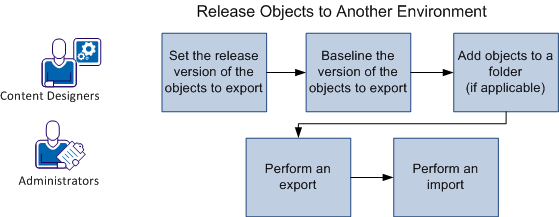
An administrator or content designer can perform this process. Typically, an administrator exports a folder as a content package from the default environment and then imports it to a production environment. The following illustration describes the process:
Follow these steps:
|
Copyright © 2014 CA.
All rights reserved.
|
|