

Install the Domain Orchestrator › Prerequisites to Installing the Domain Orchestrator › CA EEM Prerequisites › Reference Global Users from a Microsoft Active Directory (CA EEM r8.4)
Reference Global Users from a Microsoft Active Directory (CA EEM r8.4)
While you are installing CA EEM r8.4, you can select the Reference from an External Directory option and then select Microsoft Active Directory as the type.
When you use NTLM for security, select the Retrieve Exchange Groups as Global User Groups check box as in the following example:
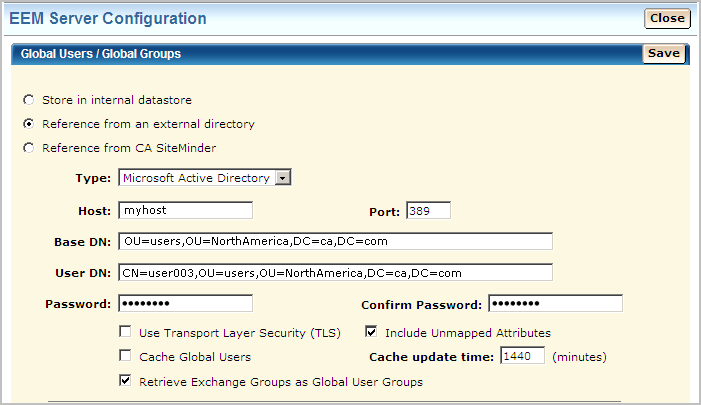
When you save the configuration, the following status messages appear:
- External directory bind succeeded.
- External directory data is loaded.
If NTLM is enabled and a global user logs in for the first time, an Authentication Required dialog opens. CA EEM then uses the NTLM protocol to authenticate users.
Reference Global Users from Multiple Active Directories (CA EEM 12.5)
While you are installing CA EEM r12.51, you can configure CA EEM to reference multiple Microsoft Active Directories or an Active Directory forest.
Follow these steps:
- Log in to CA EEM as the EiamAdmin user. Specify <Global> as the application.
- Click the Configure tab, then click User Store.
- Select User Store from the User Store palette.
- For Global Users / Global Groups, select Reference from an external LDAP Directory.
- Select Multiple Microsoft Active Directory Domains from the Configuration Type drop-down list.
- Click Add Directory and enter the first Active Directory name in the Name field.
- Under Domain Settings, enter the domain in the Domain field.
- Enter the host name and the port number in the Host and Port fields, and then click the right arrow.
The Selected Hostnames list specifies where the Active Directory is located.
- Select the protocol you need from the Protocol drop-down list.
- For Base DN (Base Distinguished Name), enter a value without spaces. The value specifies the external LDAP directory that contains data for global users and global groups. In the following example, the OU= value limits the global groups that are loaded to those in the specified organizational unit.
OU=myorganizationalunit,DC=foo,DC=com
- Specify the credentials that CA EEM is to use to access the specified Domain and Organizational Unit. This user must be a member of the Domain and the Organizational Unit specified for the Base DN.
- For User DN (User Distinguished Name), enter the Common Name of the user to connect to the external LDAP directory. Use the escape character (\) before a comma between parts of the common name. For example
CN=firstname\,lastname,DC=foo,DC=com
- Enter the password associated with the common name specified for User DN for User Password and for Confirm Password.
- Complete the Advanced Configuration or accept the defaults.
- Repeat Steps 6 through 12 for each AD to reference.
- Click Save.
When you save the configuration, the following status messages appear:
- External directory bind succeeded.
- External directory data is loaded.
Copyright © 2014 CA.
All rights reserved.
|
|