

This example uses the following operator system function to retrieve the values of a valuemap array. The function returns one field or column from an array that is based on the provided parameters.
getValueFromValueMapArray(groupName, arrName, fieldName, fieldValue, requiredFieldName)
Follow these steps:
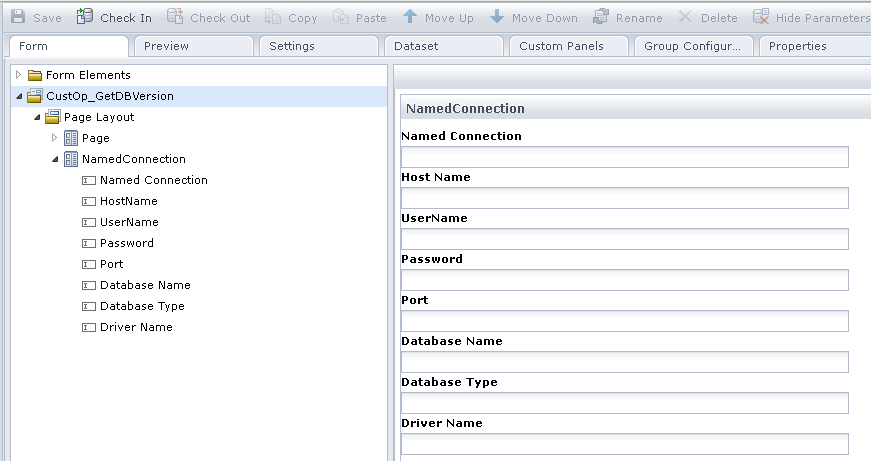
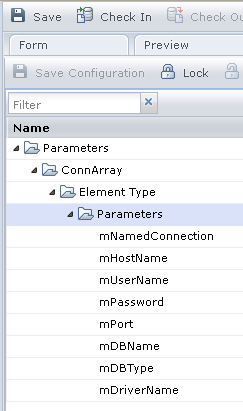
Name the form elements as mNamedConnection, mHostName, mUserName, mPassword, mPort, mDBName, mDBType, and mDriverName. Ensure that the form elements names are similar to the variable names defined in the Group Configuration tab.
Process.HostName = getValueFromValueMapArray("NamedConnectionGroupDemo", "ConnArray", "mNamedConnection", Operator.mNamedConnection, "mHostName");
Process.UserName = getValueFromValueMapArray("NamedConnectionGroupDemo", "ConnArray", "mNamedConnection", Operator.mNamedConnection, "mUserName");
Process.Password = getValueFromValueMapArray("NamedConnectionGroupDemo", "ConnArray", "mNamedConnection", Operator.mNamedConnection, "mPassword");
Process.Port = getValueFromValueMapArray("NamedConnectionGroupDemo", "ConnArray", "mNamedConnection", Operator.mNamedConnection, "mPort");
Process.DBName = getValueFromValueMapArray("NamedConnectionGroupDemo", "ConnArray", "mNamedConnection", Operator.mNamedConnection, "mDBName");
Process.DBType = getValueFromValueMapArray("NamedConnectionGroupDemo", "ConnArray", "mNamedConnection", Operator.mNamedConnection, "mDBType");
Process.DriverName = getValueFromValueMapArray("NamedConnectionGroupDemo", "ConnArray", "mNamedConnection", Operator.mNamedConnection, "mDriverName");
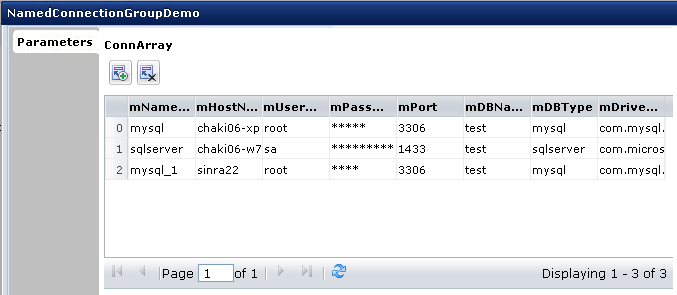
After the valuemap array values are retrieved, a production user can use the NamedConnectionGroupDemo operator in a process to reference a named connection.
The script in the custom operator pre-execution code runs. The process retrieves the values for the "mysql" connection field value entered in the named connection property and displays it in the Dataset palette.
|
Copyright © 2014 CA.
All rights reserved.
|
|