

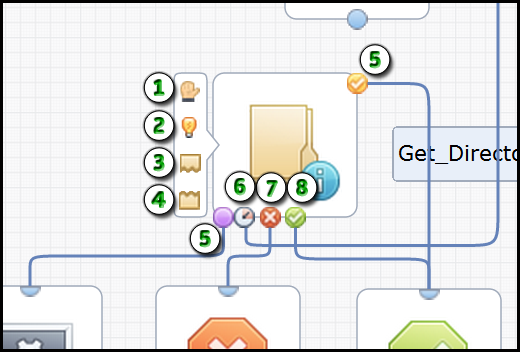
The following graphic details the smaller subset of icons that an operator can display to indicate status and port options.
|
Item: |
Description: |
|---|---|
|
|
Breakpoint: This icon indicates that you set a breakpoint in the process at this operator. Click Set Breakpoint in the toolbar. |
|
|
Simulation Mode: This icon indicates that you are overriding simulation options and have set the operator simulation type to local or distant. In the Properties palette, expand Simulation. |
|
|
Pre-Execution Code: This icon indicates the presence of JavaScript code that runs before the operator runs. In the Properties palette, expand Execution Settings. |
|
|
Post-Execution Code: This icon indicates the presence of JavaScript code that runs after the operator runs. In the Properties palette, expand Execution Settings. |
|
|
Custom Port: The process flows through a custom port when its predefined expression is true. |
|
|
Timeout Port: The process flows through this port when the operator times out. |
|
|
Failed Port: The process flows through this port when the operator yields an unsuccessful result or fails. |
|
|
Completed Port: The process flows through this port when the operator yields a successful result. |
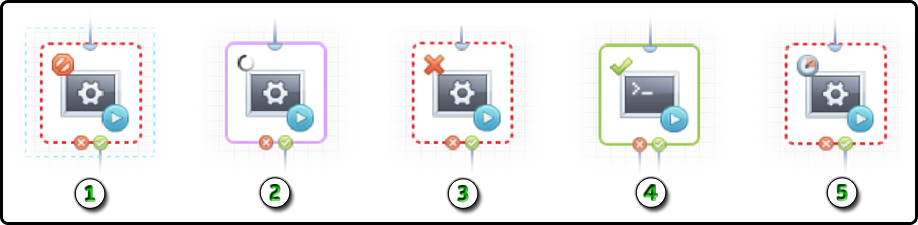
When you run a process, the following icons indicate the status of each operator.
|
Item: |
Description: |
|---|---|
|
|
Aborted: The process has been stopped. |
|
|
Running: The process is currently running. |
|
|
Failed: The process failed at this particular operator. |
|
|
Completed: The process has successfully passed this particular operator. |
|
|
Timeout: The process has timed out at this particular operator. |
|
Copyright © 2014 CA.
All rights reserved.
|
|


