

CA Process Automation datasets define and store groups of variables shared across process instances. CA Process Automation allows you to use the variables as input parameters in the execution of process instances.
After creating dataset variables for processes and operators, you might not remember variable names. Variables that are part of an operator and not something that you have defined are easy to forget. To assist you in referencing these process and operator dataset variables without going back and forth between operators, the application provides an in-context editing assistant. Known as Dataset Variable Name Assistance and invoked by pressing Ctrl+Space, this feature helps you:
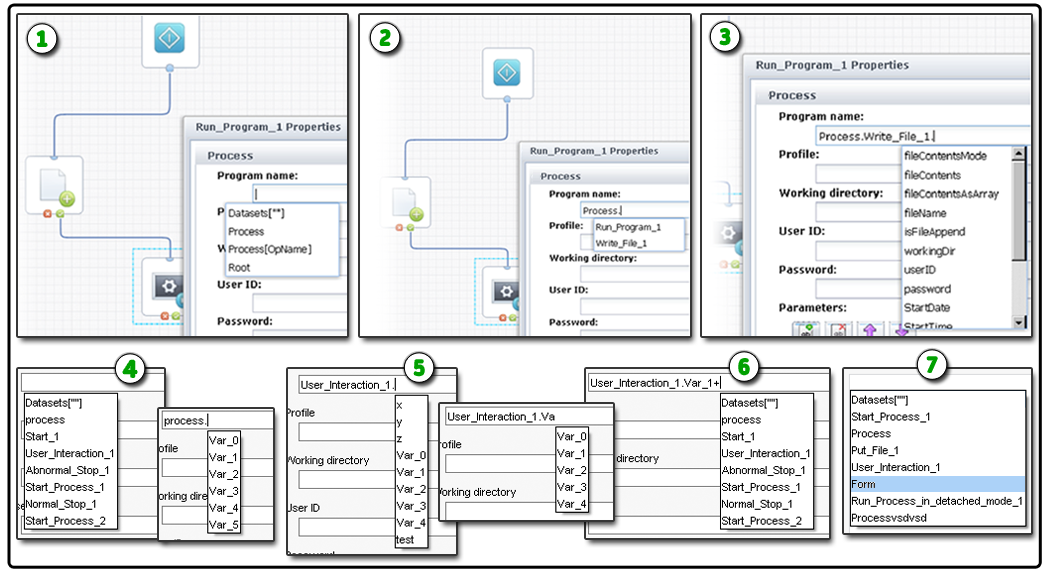
Most of the text fields that accept expressions as input support Dataset Variable Name Assistance. Refer to the following graphic for examples.
|
Item: |
Description: |
|---|---|
|
|
Suggested Values for Run Program Operator: In this example, the user has pressed Ctrl+Space to pop-up Dataset Variable Name Assistance. A list of values at the global and root levels appears. |
|
|
Suggested Operators: After entering Process. a list of operators appears at the process level. |
|
|
Suggested Variables: After specifying the process scope and operator, a list of variables appears at the operator level. |
|
|
Suggestions Based on Scope: When you first enter the field, the suggestions are appropriate at that level or scope. After specifying the process parameter, the scope of suggestions is reduced to appropriate variables at the process level. |
|
|
Updates Based on User Input: As you enter text, the application dynamically updates suggestions. In this example, typing Va reduces the possible choices to only the matching entries that begin with Va. |
|
|
Multiple Datasets: The application dynamically updates the scope of the suggestions when you specify expressions that span more than one dataset. |
|
|
Smart Suggestions: When appropriate, the application will include additional parameters based on scope and context. For example, a form operator may include the Form parameter and a Start Process operator may include the reserved word Caller. The application also automatically supports value map and array variables. |
|
Copyright © 2014 CA.
All rights reserved.
|
|


