

Process operators apply functions or perform actions to yield a result. The collective results of a series of operators determine the automated flow through the process.
|
Item: |
Description: |
|---|---|
|
|
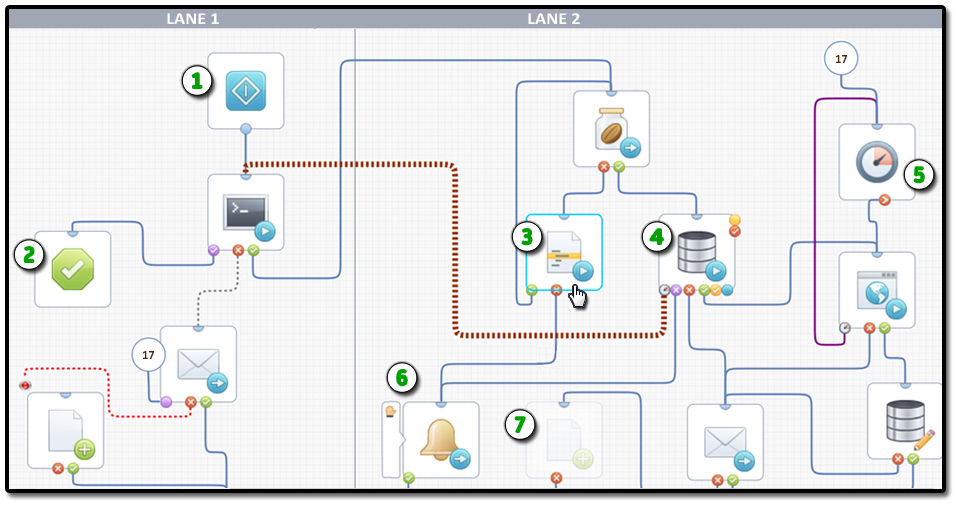
Start Operator: All processes include at least one Start operator with no entry port and a single exit port. It is possible, although rare, to have more than one Start operator in a process. |
|
|
Stop Success Operator: All processes include at least one Stop operator. Stop operators come in two flavors or types: success (shown here) or failure. |
|
|
Selected Operator: The currently selected operator border appears as a dashed outline. The Properties palette displays the currently selected operator's settings. |
|
|
Database Query Operator with Multiple Exit Ports: As you add ports, they appear around the operator's bottom and right edges. Each port represents the process flow for a particular result. Note: Right-click an operator to add a port. |
|
|
Delay Operator with After Port: Delay operators do not include successful Completed or Timeout ports. In addition to a custom result port, they feature just two default ports: After and Failed. Different operators include different ports. |
|
|
Send Event Operator with Breakpoint Indicator: Status indicators appear when you click Set Breakpoint. |
|
|
Disabled Operator: When you disable an operator, the designer gives it a transparent appearance. You can decide later to enable it. |
|
Copyright © 2014 CA.
All rights reserved.
|
|


