

A default Start operator is automatically applied when you create and open a new process. The Start operator has no entry port. Configure the properties for the Start operator in the Properties palette. For example, you can change the name, specify a custom icon, or change the location and text in the icon label.
The Start operator starts a chain of operators in any process. When a new process begins, it immediately activates the Start operator. All operators must be linked either directly or indirectly to this chain of operators. A process can have multiple Start operators to initiate multiple processing paths. These paths are also known as branches or subprocesses. However, as a general rule, a process really only needs one Start operator. As the example shown at right illustrates, a more efficient design utilizes the same Start operator and perhaps even the same Stop Success operator. Multiple links can share the same operator.
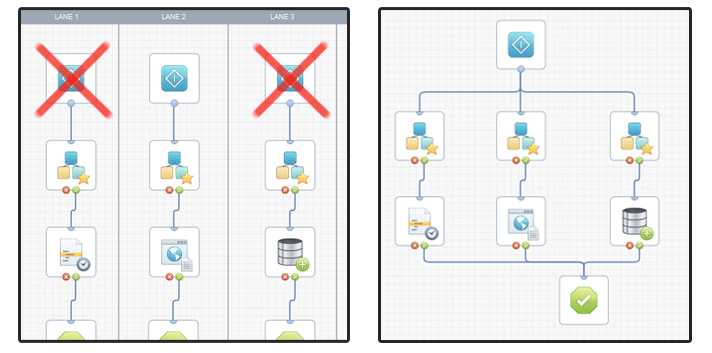
Note: Running multiple branches in parallel with multiple Start operators can result in confusing log entries. The logs may be difficult to analyze because the run sequence of branches with multiple starts may appear to be in random order. In most cases, use a single Start operator for each process.
|
Copyright © 2014 CA.
All rights reserved.
|
|