

The Manage Resources operator is in the Process Control operator group. A process can use the Manage Resources operator to take available units from a specified resource. If all units of the specified resource are taken (in the same or different processes), the Manage Resources operator delays processing along that branch until the resource has free units.
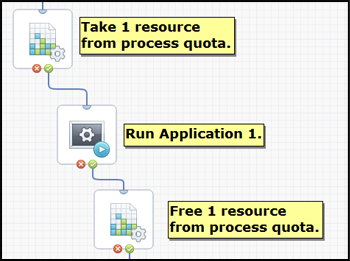
The following design shows a process taking one unit from the process quota resource before running an application. If there are available units in the process quota resource, processing continues to Run Application 1. If there are no available resource units, processing does not start until either units become available or the operator times out. After the Run Application 1 operator ends, the resource unit is freed back to the process quota resource, and processing continues with subsequent operators in the process.
Resources let you define the number of units available and how many units are consumed. A resource consists of a maximum number of units, the current value of available units, and a flag indicating whether the resource is locked.
You can take the following actions with resources:
A Manage Resources operator can consume or free any specified number of resources. As a developer or administrator, you can use Manage Resources operators to tune the load balancing on a particular touchpoint. You can also lock a resource to prevent consumption of resource units by any other process.
The following constraints apply to resources:
|
Copyright © 2013 CA.
All rights reserved.
|
|