

|
|
|
When end users click Maintain Projects on your top‑level panel, the property sheet should open to the Projects and Tasks tab. When they click Maintain Employees, the property sheet should open to the Employees tab. Before you can do this, you have to modify the Project Property Sheet function to accept a starting tab number as an input parameter.
To enable the property sheet to open to a specific tab:
In the following steps, you add the FIELDS/Tab field to the Input variable in the Input variable group. The value of this Tab field specifies which tab of the property sheet to display.

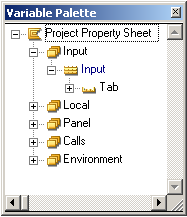
Now, any function that calls the Project Property Sheet function has to pass in a value for this field. Next, you add a statement to use that value to determine which tab to display.
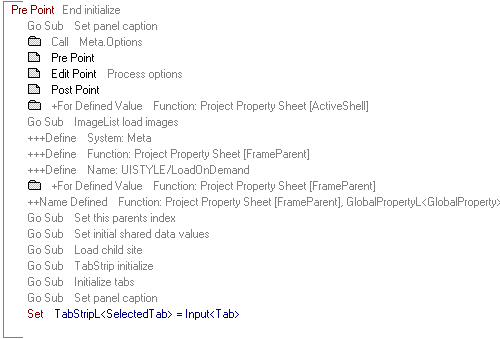
There is already code in the Pre Point. The statement you add goes at the end, after what is already there.
Set TabStripL<SelectedTab> = Input<Tab>
This sets the displayed tab to the one indicated in the input variable. The action diagram should look like this:
| Copyright © 2012 CA. All rights reserved. | Tell Technical Publications how we can improve this information |