

You can give the Project entity a user interface and functionality to interact with a database using inheritance.
To add functionality to the Project entity
Note: There is no plus sign (+) to the left of the Project entity. This tells you that there are no objects scoped to it.
To add these triples, you must first set the source object type to Entity in the Model Editor. You could change the object type directly. But, when you drag an object from the Object Browser, it sets the object type and shows all of the triples for that object.
This is similar to using the Inspect toolbar button; it changes the Model Editor so that it only shows triples related to the Project entity, changes the object type (assuming it was not already set to Entity), and puts Project in the source object box.
Note: The is a verb that you use in this step is different from the one that you used to specify in inheritance for Project’s fields. There are several verbs that have the same name, but have a different source and target object. CA Plex only lets you select the verb that matches the target object (in this step, the is a ENT verb). For more information about the types of is a verbs, search for is a in the online help index.
You just created the triple Project is a FOUNDATI/EditDetail. This indicates that Project inherits the structure and functionality of the EditDetail pattern in the FOUNDATION pattern library. You can find the FOUNDATION/EditDetail pattern in the Object Browser by making sure that library objects are displayed (by clicking the Show/Hide Library Objects toolbar button) and scrolling down.
For more information about the EditDetail pattern, select it in the Object Browser, and press Shift+F1.
In the Object Browser, click the Refresh toolbar button.
By inheriting from EditDetail, the Project entity now has some scoped objects.
For more information about scoped objects, see More About Scope later in this chapter.
Click the plus sign (+) to the left of the Project entity and then click the Edit function to expand the Project entity and the Edit function.
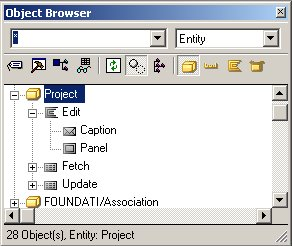
Project inherited one function, Edit, with a scoped panel and a caption, and two views, Fetch and Update. These objects give Project a user interface, and enable it to store data to and retrieve data from a database.
Specifically, CA Plex performs the following actions:
Next, indicate how the Project entity stores information. Your application uses a relational database, so you need processing that creates and maintains database tables. Set Project to inherit from STORAGE/RelationalTable for that functionality.
The Model Editor should still have Project in the source object box, and is a ENT showing in the verb list.
Drag STORAGE/RelationalTable from the Object Browser to the target object box, and press Enter to create the following triple:
Project is a STORAGE/RelationalTable
The object browser will look like this:
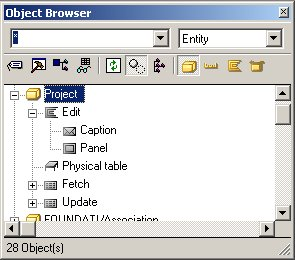
Notice that the Project entity has inherited an object called Physical Table from STORAGE/RelationalTable. This defines the table that is created in the database when you generate the application. The fields that you defined for the Project entity are stored in this table.
Microsoft Office Access does not support views. However, the ODBC driver supports the SQL CREATE VIEW statement, and will create a query in Microsoft Office Access.
This means that generating and building a view in CA Plex creates a query in Microsoft Office Access. Microsoft's technical support described this situation as an undocumented feature. We do not recommend that you use it in CA Plex. Instead, set all views to have VW type SYS = Table Access, so that views are actually implemented.
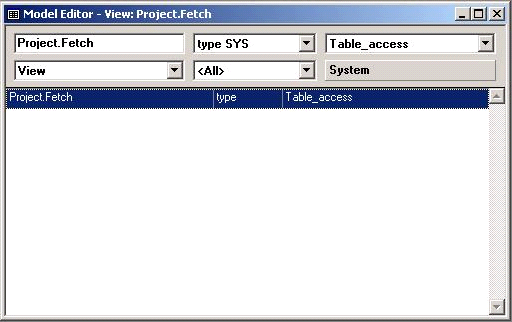
13. Create the same triple for the view Project.Update.
|
Copyright © 2014 CA Technologies.
All rights reserved.
|
|