

In CA Plex, you define objects and specify relationships between them with triples. As the name implies, a triple has three parts: a source object, a verb, and a target object.
For example, in this chapter, you use the following triple to define a unique identifier for the Project entity:
Project known by FLD Project ID
In this example, Project (an entity) is the source object of the triple, known by (or known by FLD) is the verb, and Project ID (a field) is the target object.
In CA Plex documentation, verbs are always printed in bold and usually with their source and target object types (ENT known by FLD, for example).
Triples provide a simple, easily understood language for entering information into CA Plex. Here are some more examples of triples that you will enter while creating your first application:
In this sample application, triples are entered to define fields for the Project entity: an identifier, a description, and start and end dates for a project.
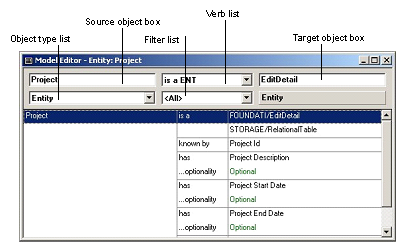
You use the Model Editor to view, add, edit, and delete triples. The following is the Model Editor as it will appear when you complete this chapter.
|
Copyright © 2014 CA Technologies.
All rights reserved.
|
|