

If an examination of the system overview reveals a memory limitation, you can investigate the cause of the limitation in more detail using the Memory display. The following illustration is an example of the Memory display:
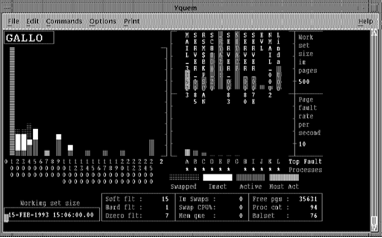
The Memory display draws attention to the following indicators:
Look at the value of Hard flt and Soft flt. Hard flt gives the number of page faults per second that were resolved by reading from the disk. Soft flt gives the number of faults per second resolved from memory. A hard fault involves I/O and is more expensive than a soft fault. Hard faults in a properly managed system should be no more than about 10 percent of the total faults (Hard flt + Soft flt).
Look at the Process bars at the right on the Memory display. This shows the working set size and page fault rate for the top faulting processes. Adjust the scaling factors, if necessary. Look for processes that are faulting heavily but have small working sets. If your system has ample memory, increase the working set quota (WSQUOTA) and the working set extent (WSEXTENT) for these processes. If memory is short on your system, increase WSQUOTA and WSEXTENT for these processes at the expense of processes that are not faulting but have large working sets.
Look at the Process bars at the right on the Memory display. Look for top faulting processes with fluctuating working set sizes. If the working set size for such a process increases and decreases accompanied by page faulting, then the AWSA parameters might be out of adjustment. System parameters that affect automatic working set adjustment are PFRATH, PFRATL, WSINC, WSDEC, AWSTIME, AWSMIN, GROWLIM, BORROWLIM, and QUANTUM. Automatic decrementing can be turned off by setting PFRATL = 0 (this is normally recommended). Do not change any of the other parameters without a thorough understanding of the AWSA mechanism.
The automatic memory reclamation mechanism of OpenVMS should be enabled. This is controlled with the SYSGEN parameter MMG.CTLFLAGS.
Look at the value of Dzero flts. A large number of demand zero faults indicates an excessive number of image activations. Activating an image in a process involves considerable overhead. If Dzero faults is a large percentage of total faults (Hard flt + Soft flt), image activations might be excessive. Paging induced by image activations is unlikely to respond to system parameter changes. Application design changes are needed.
Look at Proc cnt (number of processes on system), Balset (number of processes in balance set), Free pgs (number of pages of free memory), and swapped processes. If the balance set count is too small, processes are swapped even if there is still free memory. If Balset is significantly less than Proc cnt, and Free pgs is adequate, then the balance set count is too low. Set the system parameter BALSETCNT to a value two less than the system parameter MAXPROCESSCNT.
Look at the Process bars, in particular for active processes with large working sets. For example, a low priority compute-bound process is less likely to be swapped than one that performs terminal I/O. They may cause other processes to swap.
Decreasing DORMANTWAIT may help if the large processes are above their working set quotas. You can also suspend the large process with SET PROCESS/SUSPEND and allow the swapper to trim it back to SWPOUTPGCNT. The underlying problem might be that WSQUOTA is too large for the process.
Look at the Working Set and Process bars for inactive processes with large working sets. If these processes have swapping disabled, they cannot be swapped but retain memory at the expense of other processes. Use the system dump analyzer (SDA) to see if a large, inactive process has the PSWAPM (prohibit swap mode) bit set.
Look at the page fault rate (Hard flt and Soft flt), free memory (Free pgs), and swapping (Working Set and Process bars).
If the overall fault rate is high, and the faults are mostly soft faults, the page cache might be too large. This may also be accompanied by swapping and extensive free and modified page lists. The page cache is encroaching on memory that could be made available for working sets.
If the overall faulting rate is low while the hard fault rate is high, the page cache is ineffective; that is, the free page list and/or modified page list is too small. There is ample memory for working sets but the caching effectiveness is low.
The sizes of the page caches are controlled by the system parameters FREELIM, FREEGOAL, MPW_LOLIMIT, and MPW_THRESH.
|
Copyright © 2008 CA.
All rights reserved.
|
|