

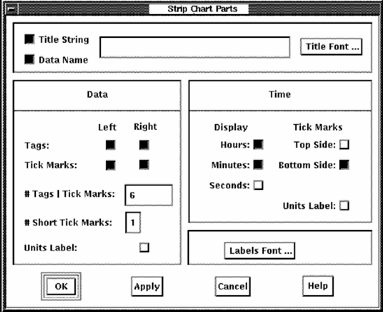
The Strip Chart Parts dialog lets you specify the following attributes:
Set the toggle button to display a title. Enter a title in the text entry box.
Set the toggle button to specify the title to be the metric name, overriding any supplied string.
The Font Selection dialog lets you specify the following font characteristics:
Font options not available on your server will be disabled.
Specifies whether the tags are displayed on the left or right side of the chart, or both.
Specifies whether tick marks are displayed on the left or right side of the chart, or both. Tick marks can be displayed without tags. When tags are selected, tick marks are displayed automatically.
Specifies the number of tags and corresponding tick marks to be displayed. The default is six tags.
Specifies the number of minor tick marks to be displayed. The default is one.
Specifies whether the units label is included in the display.
Specifies whether the time display will include hours, minutes, and seconds or a subset of these.
Specifies whether tick marks are displayed on the top or bottom of the chart, or both.
Specifies whether the time units label in included in the display.
The Font Selection dialog lets you specify font characteristics.
|
Copyright © 2008 CA.
All rights reserved.
|
|