

To start the Real-time Display
$ ADVISE PERFORMANCE DISPLAY WINDOW -
_$ /MODE={NETWORK|DISKFILE}/NODE=(nodename[,...])
For more information about command syntax, see the chapter Performance Manager Commands.
Note: The output for the Real-time Display must be directed to your display using the DCL SET DISPLAY command. For more information on starting Performance Manager Real-time and a complete description of all parameter options, see the chapter Customize the DECwindows Motif Real-time Display.
The Real-time Display shows the following default panel on your display:
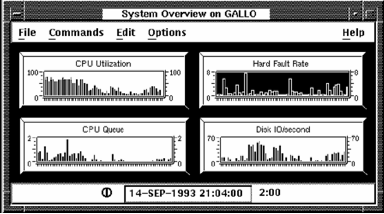
If the primary Performance Manager is not running on the monitored system, or the Real-time data collector is unable to start, an informational message is displayed. The Performance Agent Administrator Guide describes the steps that the system manager needs to take to enable data collection for a user.
|
Copyright © 2008 CA.
All rights reserved.
|
|