

To monitor the work in progress
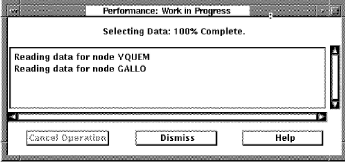
The work that is being monitored is the reading of the Performance Manager data files and the building of the internal data structures needed for the requested analysis.
This work is started as a result of data selection. See the section How You Select Data for Analysis for information on requesting an analysis of performance.
No reporting capabilities are allowed until a complete data selection is performed.
The Main Window's Data Selected for Processing Section is updated to reflect the new selection.
If data is missing from the selected time period, missing data messages appear in the Work in Progress box. This is to alert you that a subsequent examination of the selected analysis period may be incomplete or inaccurate.
The length of time required to read and analyze the selected data depends on the options selected (such as hot file information) and the duration of time (1 hour as opposed to one day). You may want to remove the Main window and leave only the Work in Progress box on the screen.
|
Copyright © 2008 CA.
All rights reserved.
|
|