

Use the DECwindows Motif Real-time Display › Change the Colors and Patterns
Change the Colors and Patterns
You can customize the colors used in any part of a PA Real-time Display panel or instrument.
To change the high threshold color for the strip chart in the CPU panel
- Select the instrument by pressing MB1 within the instrument's border. The instrument will appear depressed to indicate that it has been selected.
- Press MB3 and hold to get the pop-up menu.
- Choose Colors and Patterns by moving the cursor over this selection and releasing the MB3 button. The following dialog box is displayed:
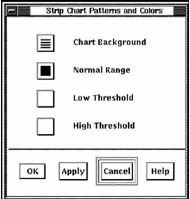
This dialog box lets you set colors for the thresholds set in the Ranges and Thresholds dialog. You can use these colors to alert you to potential performance problems.
- Alter the background or the threshold colors by clicking on the associated button on this dialog. The Pattern Editor dialog is displayed.
- Select new patterns and colors for each graph part, click OK on all dialoges to effect the change.
Copyright © 2008 CA.
All rights reserved.
|
|