

Release on the Brief Analysis menu item from the Display menu to open a Performance Manager Analysis Report Window.
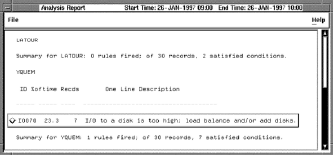
The Brief Analysis Report lists the rules that fired during the analysis period. Click anywhere on the rule and Performance Manager DECwindows opens another Analysis Report Window that displays the fired rule's conclusions, conditions, and evidence.
To return to the Brief Analysis Report, pull down the File menu and release on the Close menu item or click the Close button at the bottom of the window.
|
Copyright © 2008 CA.
All rights reserved.
|
|