

Events provide useful information when monitoring the health and status of your network environment. Plus, by integrating with CA Spectrum you can use events to automate processes that are based on data in an event message.
Data Aggregator handles events using monitoring profiles. Monitoring profiles can contain a set of event rules. Using metrics (from your metric families), these rules define the conditions that you want to watch for.
To implement your event rules, associate the monitoring profile with a device collection.
Important! The key to starting and stopping the monitoring process is the device collections. Data Aggregator cannot use a monitoring profile unless you associate it to at least one device collection.
Immediately, Data Aggregator applies the rules in that monitoring profile to the devices in that device collection. Using the metric values that are polled for these devices, the rules trigger and clear events as needed.
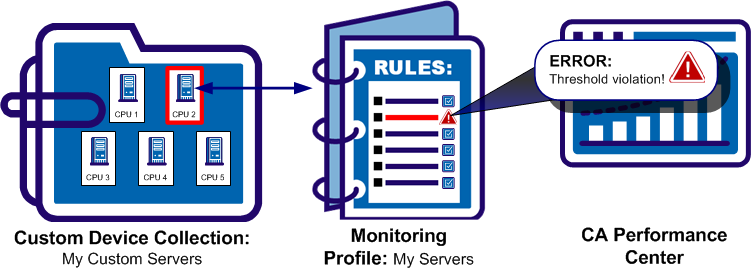
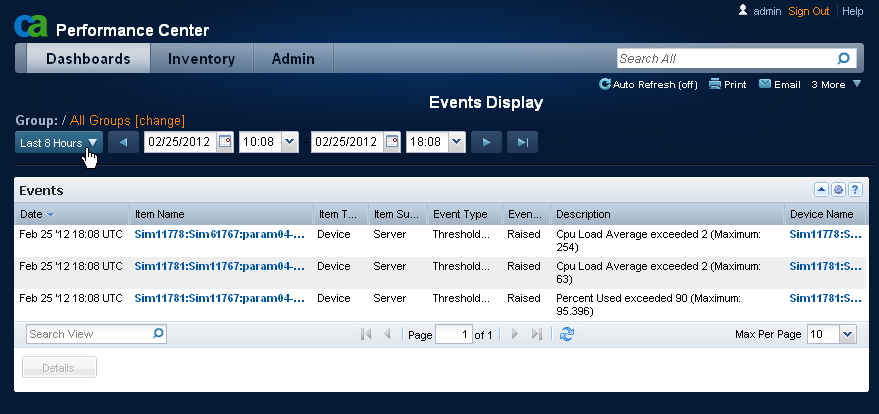
Events display in a CA Performance Center dashboard.
Note: You can generate user-visible alarms in CA Spectrum from events that are processed and logged in Data Aggregator. For more information, see the CA Spectrum documentation.
|
Copyright © 2015 CA Technologies.
All rights reserved.
|
|