

As indicated in the diagram in Data Source Support for Multi-Tenancy, CA Network Flow Analysis supports the multi-tenancy features in CA Performance Center. However, take care when selecting user account product privileges. The product privilege to a data source enables a user to drill down from a view in CA Performance Center back to the source of the data.
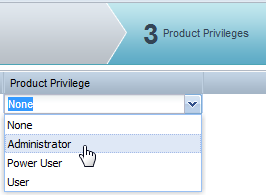
Assuming that you have carefully segregated data from different customer environments into separate tenants, you probably want to prevent users from returning to the CA Network Flow Analysis interface. In that interface, tenant separation is not applied for users at the Administrator and Power User level—all data is available for viewing in reports. Product privileges are set in the Add or Edit User Account wizard.
Important! Assign the 'User' product privilege to any user who does not require access to all data in the CA Network Flow Analysis data source.
Another point to consider is the 'Manage Reports' role right for CA Network Flow Analysis. A user who has this role right can view all data in the CA Network Flow Analysis console.
|
Copyright © 2015 CA Technologies.
All rights reserved.
|
|