

As a CA Performance Center administrator, you want to give a coworker in the IT organization permissions to use the product. You want to create a custom menu for this new operator to reflect this person's organizational responsibilities.
Onboarding a unique CA Performance Center operator involves creating a menu and populating the menu with either predefined or custom dashboards. You also create a custom role for the new user and assign the role to a new user account.
Finally, you log in to the new user account to test account permissions and determine whether adjustments are required.
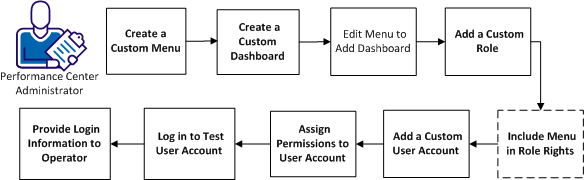
|
Tasks |
|---|
|
Copyright © 2013 CA.
All rights reserved.
|
|