Start or Shut Down CA OM Web Viewer › Shut Down CA OM Web Viewer
Shut Down CA OM Web Viewer
If you installed the Tomcat Java Web application server accompanying with CA OM Web Viewer, you can shut down the server in one of the following ways according to your operating environment:
- Windows:
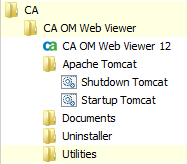
- Option 1: Find the shortcut Shutdown Tomcat in your Windows Start menu and run it.
- Option 2: If you chose to register it as a Windows service, use the Services administration tool to find and stop the service named Tomcat6forCAOMWebViewer12.
- Option 3: Go to the apache-tomcat folder where you installed the bundled Apache Tomcat web application server. Execute the script apache-tomcat\bin\shutdown.bat
- Other platforms: Go to the apache-tomcat folder where you installed the bundled Apache Tomcat web application server. Execute the script apache-tomcat/bin/shutdown.sh
|
Copyright © 2011 CA.
All rights reserved.
|
|

