

|
|
|
Do the following:
To start the application
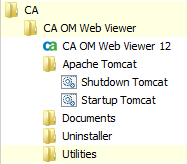
If you installed the Tomcat Java Web application server accompanying CA OM Web Viewer, you can launch the server in one of the following ways according to your operating environment:
http://HOST_NAME:PORT_NUMBER/CAOMWebViewer12
| Copyright © 2011 CA. All rights reserved. |
|