

Working with Interfaces and Routers › Available Interfaces Page
Available Interfaces Page
The Available Interfaces page displays information about routers and interfaces. The list of routers and interfaces include the interfaces that have never been enabled and have never been the source of collected data. You can enable or disable interfaces, delete end-of-life routers and their interfaces, and perform some polling troubleshooting.
Router Tasks:
- Review the displayed data, including the total number of interfaces, number of enabled interfaces, and the SNMP profile that was used.
- Perform a test poll with the current SNMP profile (Test).
- Look for an SNMP profile (Discover).
- Refresh the polling and interface information for the poller (Refresh).
- Enable or disable all of the interfaces for a router.
- Delete an end-of-life router and its interfaces from the system.
Interface Tasks:
- Review the displayed data, including the most recent time that flow was received and the enabled or disabled status.
- Enable or disable interfaces individually.
Follow these steps:
- Open the Available Interfaces page:
- Select Administration from the NFA console menu.
The Administration page opens.
- Select System: Enable Interfaces in the Administration menu.
The Available Interfaces page opens.
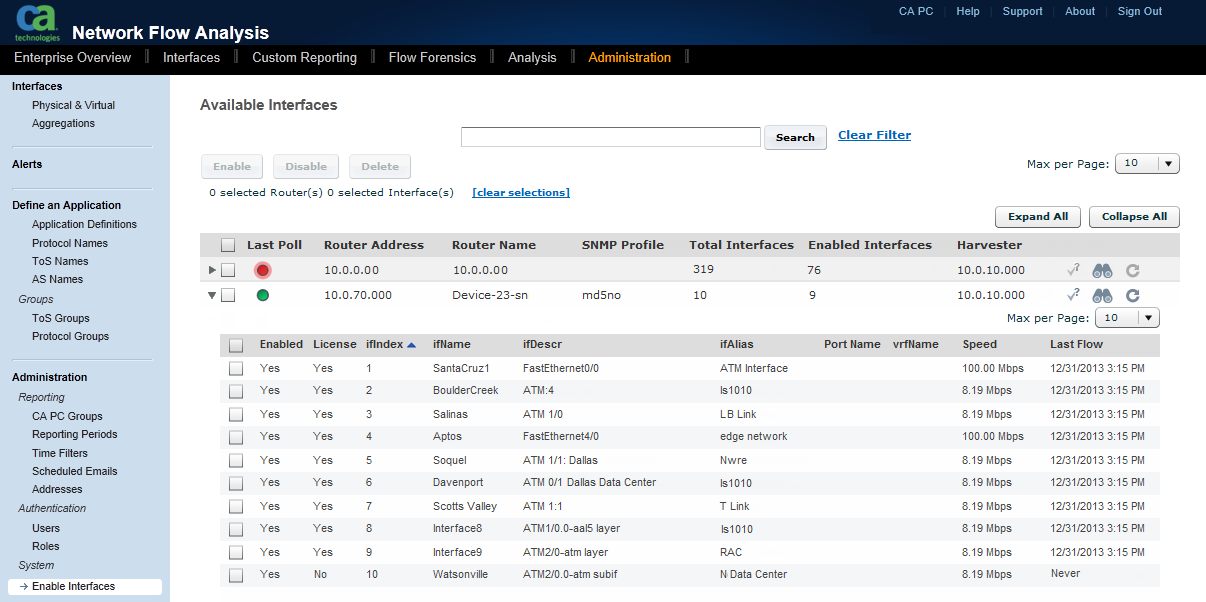
- Use the information and options in the following ways, for example:
- Enable interfaces that you want to begin using.
- Disable interfaces that you are not using.
- Delete routers that you will not use again.
- Review the information that is displayed as described in Router Information and Interface Information.
Copyright © 2014 CA.
All rights reserved.
|
|