

The Single Sign-On Configuration Tool lets you change the default settings for the CA Performance Center website and web service. For example, you can specify a different host or port number for the CA Performance Center web service. These settings instruct the Single Sign-On application how to connect to CA Performance Center.
Follow these steps:
Log in as root or with the 'sudo' command.
[InstallationDirectory]/CA/PerformanceCenter
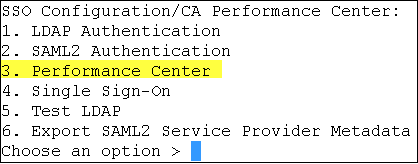
You are prompted to select an option. The available options correspond to CA applications running on the local server.
You are prompted to select a configuration option.
You are prompted to specify the priority.
The Priority parameter only applies to CA Performance Center.
Refers to settings that only administrators can change. Such settings are propagated to all other CA products registered to this instance of CA Performance Center. Remote Value settings are only used if a corresponding Local Override value is not present.
Refers to settings that can be changed for all products. If a Local Override value is present, it takes precedence over both the Remote Value and default settings.
You are prompted to select a property to configure.
Specifies the URL scheme that the Single Sign-On application can use to access the CA Performance Center web service. Change this value to ‘https’ if you are using SSL for encryption.
Specifies the URL of the host where the Single Sign-On application can access the CA Performance Center web service.
Specifies the URL port that the Single Sign-On application can use to access the CA Performance Center web service.
Specifies the URL path that the Single Sign-On application can use to access the CA Performance Center Inventory web service.
Specifies the URL path that the Single Sign-On application can use to access the CA Performance Center Product Request web service.
Specifies the URL scheme that the Single Sign-On application can use to access CA Performance Center. If you have set up SSL, use https://.
Specifies the URL host that the Single Sign-On application can use to access CA Performance Center.
Specifies the URL port that the Single Sign-On application can use to access CA Performance Center.
Specifies the URL path that the Single Sign-On application can use to access CA Performance Center.
Specifies whether the Simple Mail Transfer Protocol (SMTP) is enabled to allow CA Performance Center operators to email reports and event notifications.
Default: Disabled.
Is the IP address of the SMTP server.
Default: Disabled.
Specifies the port to use for SMTP requests.
Default: Port 25.
Specifies whether to use SSL encryption when sending email from CA Performance Center or other CA data source products. Verify that SSL has been properly set up on your system before you enable this option.
Default: Disabled.
Specifies the return address to use for email messages that are generated by CA Performance Center. Enter u to update the value, and supply an email address. Use the format username@mydomain.com.
Specifies the format to use for email messages that are sent by CA Performance Center. Enter u to update the value, and supply either HTML or text.
Specifies a username to use when the email server challenges an SMTP request. Supply a username, or supply an empty string to disable client-side authentication.
Specifies a username to use when the email server challenges an SMTP request. Supply any valid password. The SMTP Username parameter is required.
You return to the previous set of options.
The Single Sign-On Configuration Tool closes.
CA Performance Center directs all users to the Single Sign-On website using the new values that you supplied.
|
Copyright © 2013 CA.
All rights reserved.
|
|