Custom Reports › Set Up Custom Reports › Add, Delete, and Exclude Interfaces for Custom Reports › Delete Interfaces and Interface Groups
Delete Interfaces and Interface Groups
You can delete filters from Custom Report definitions as needed. When you delete interfaces or interface groups from a report definition, those interfaces are not included in the report data.
Follow these steps:
- Select Custom Reporting from the NFA console menu if the Custom Reporting page is not already open.
- Put the report in editable mode: Click the name of the report. If the report has been run previously, it runs again. In this case, click Edit in the Report Settings section at the top of the report page.
The Report Definition Summary page opens, which contains links to the Custom Report wizard pages.
- Click Interface Filters to open the Select Interfaces page of the Custom Report wizard.
- Select the check box in the interface list next to each interface you want to delete.
- Click the Remove Selected Filters icon that is located above the check boxes.
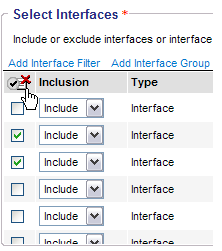
- Click Save Changes.
Your changes are saved and you return to the Report Definition Summary.
Note: If you select a scheduled Custom Report that uses a deleted interface or interface group, the "Unknown interface group" message is displayed. If all the associated interfaces or interface groups are deleted, the report will not run.
- (Optional) Click one of the following buttons to return to the report list:
- Return to Listing: Return to the report list on the Custom Reporting page.
- Queue Report: Queue the report to run and return to the Custom Reporting page.

