Quick Tours › WebCenter Tours › Diagnose Network Problems
Diagnose Network Problems
Use this procedure to review the connectivity of a specified host.
To display diagnostics information
- Click Diagnostics, IP Nodes.
The IP Node Diagnostics page appears.
- Enter the IP address or name of a remote node, and click a tab to perform one of the diagnostic functions. For example, click Connections.
Connections with the node are listed.
To perform a packet trace
- Identify a connection that has packets flowing, that is, there is activity in the Bytes Out and Bytes In columns.
- Select the Activate Packet Trace action for the connection, click Go, confirm the action, and wait for a few seconds to collect packets.
The packets are traced for this connection, as flagged in the Tracing column.
- Select the View Packet Trace action, and click Go.
The most recent packets in the connection are listed, for example:
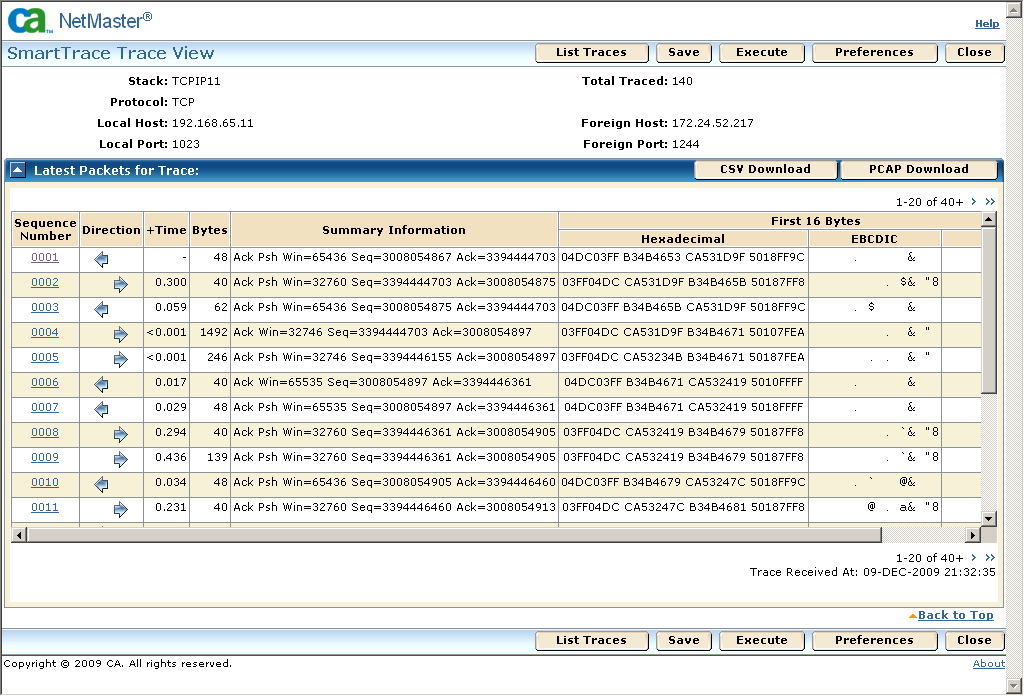
- Click the Sequence Number link of a packet.
The date for that packet appears.
When you finish with the trace, return to the IP Diagnostics page, select Clear Packet Trace, and click Go to stop and delete the trace.
|
Copyright © 2012 CA.
All rights reserved.
|
|

