Introduction › How the Product Works
How the Product Works
CA NetMaster NM for TCP/IP is a VTAM application program that runs as a started task on a z/OS system. A running instance (an MVS address space) is known as a region (TCP/IP management region). The region performs IP network management functions, 3270 and web user interface processing, and has internal interfaces to MVS, VTAM, and stack facilities and data. The following illustration shows the main product components and the flow of data:
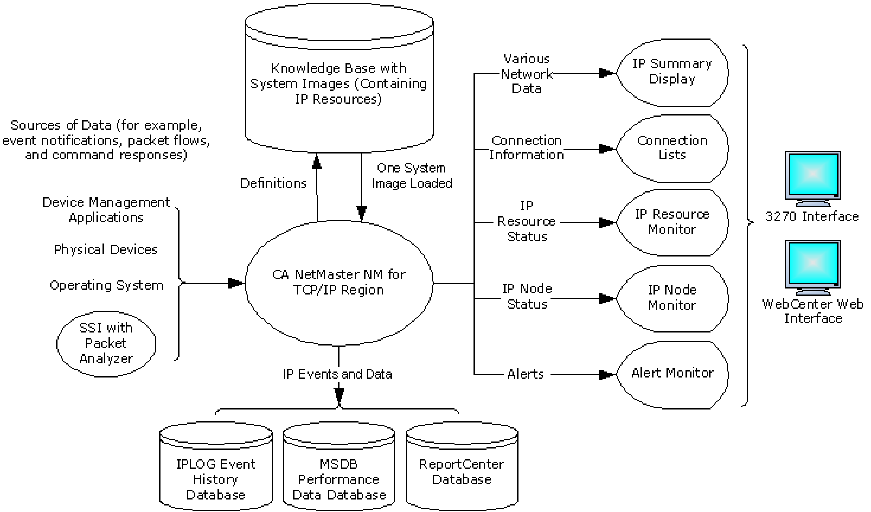
The following process shows how the product works:
- The product region gets data from various sources, for example:
- When the region receives the data, it acts on them according to the definitions in the loaded system image and defined event detectors.
- A system image contains definitions for resources such as address spaces, stacks, and nodes. The definitions provide monitoring for various attributes to gauge the health of the resources and optionally act when a problem is detected. The Express Setup facility helps you build the initial system image.
- An event detector contains criteria to detect specific network or system events. Initially, no event detectors are active.
- Based on the data, the region presents the health of your network on various displays. You can define filters to select what you want to display.
- The IP Summary Display provides a single place from where you view a snapshot of the most useful information about your network environment. Data on this display is sourced from the Packet Analyzer.
- The connection lists show information about connections such as fragmentation, retransmissions, and round-trip time (RTT). You can diagnose a connection by performing tasks such as pinging the remote host, tracing the route, and tracing packets.
- The IP Resource Monitor and the IP Node Monitor show the status of managed resources and nodes. In addition to various diagnostic tasks, you can review the performance of a resource or node through monitored attributes.
- The Alert Monitor shows alerts that warn you of any problems or critical activities (for example, an alert indicating that the RTT to a node is excessive).
- The region stores data in the following databases:
- Start, completion, and failure event records in a history database
- Performance data in the MSDB database and, if ReportCenter is configured, in the ReportCenter database.
These databases let you report on network activities, which can help you plan your network. You can use WebCenter to produce these reports, which provide a rich presentation with graphs.
More information:
How You Learn About Your Network
How You Diagnose Connections
How You Manage IP Resources
How You Manage IP Nodes
How You Use Historical Performance for Planning
|
Copyright © 2012 CA.
All rights reserved.
|
|

