

|
|
|
Note: For CNM data flow, there must be a copy of CA NetMaster NM for SNA licensed in the same region as this product.
You perform this procedure using the first page of the CNM and the ISRIN Customizer : Parameter Group panels.
 PROD------------------ Customizer : Parameter Group ----------------Page 1 of 2
 Command ===>                                                  Function=Browse

 .- CNM - CNM Interface Details -----------------------------------------------.
 |                                                                             |
 |   CNM ACB Name .............. NMCNM  (default NMCNM)                        |
 |       Current status/Name ... ACTIVE NMCNM                                  |
 |   CNM Procedure Name ........ $NWCNMPR  (default $NWCNMPR)                  |
 |       Current status/NCL ID   Active 000470                                 |
 |   Initially Active? ......... YES       (Yes, No, default YES)              |
 |   Currently Active? ......... YES       (Yes to Activate, No to Suspend)    |
 PROD------------------ Customizer : Parameter Group ----------------Page 1 of 1
 Command ===>                                                  Function=Browse

 .- ISRIN - ISR (Inbound) -----------------------------------------------------.
 |                                                                             |
 | PPO Messages:                                                               |
 |   ISR Link Name .............                                               |
 |   Is the ISR Link to NetView?  ________ (No if NetMaster, Yes if NetView)   |
 | CNM Data:                                                                   |
 |   ISR Link Name .............                                               |
 |   Is the ISR Link to NetView?  ________ (No if NetMaster, Yes if NetView)   |
To send and receive CNM data in CA NetMaster NA:
Note: If the ACB specified is unable to receive unsolicited CNM data, the name of the CA NetMaster NM for SNA or Tivoli NetView region where it resides must be specified in the ISR Link Name field on the ISRIN Parameter Group panel.
LINK START=link-name
ISR ENABLE=NEWS LINK=link-name SOL=YES UNSOL=OUT
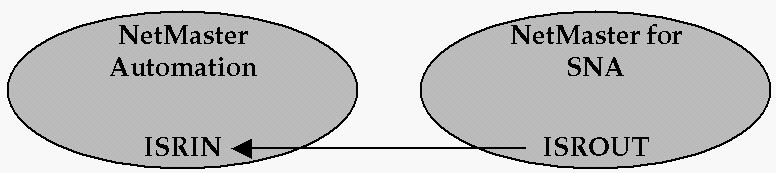
link-name is the CNM data ISR link name in the ISROUT parameter group. The following illustration shows this relationship.
Note: For more information about the parameter groups, press F1 (Help) to display the help.
| Copyright © 2012 CA. All rights reserved. |
|