

The Server can collect SMF data either directly or indirectly.
The following section describes how to enable the Server to collect SMF data indirectly by using the spooling interface option.
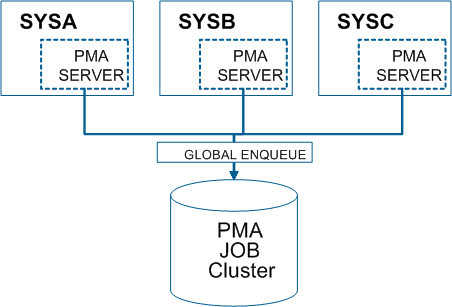
The following illustration shows how direct SMF recording works without using the spool feature.
The following illustration shows how indirect SMF recording works with the spool option enabled.
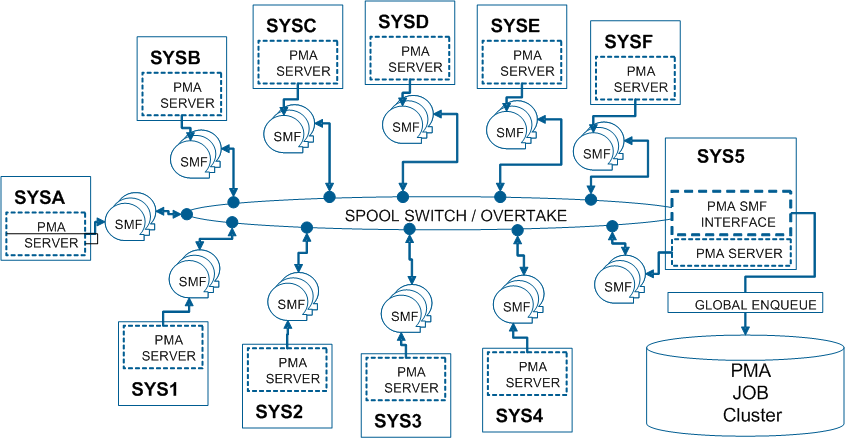
When the spooling interface option is enabled, the spool interface started task (APCSASIP) causes all active Servers to switch to new spool files at the end of each spool interval. It then sorts and merges the SMF data from the switched spool files, performs an update of the job file, and saves the sorted and merged SMF data in GDG.
If for some reason APCSASIP is not running, the Servers can still function and the SMF data will continue to be spooled as normal. If a spool file becomes full, an internal switch will take place and the switched data will be automatically processed when the SIP becomes available.
You can define spool data set allocation parameters and spool interval parameters by selecting option 5—Spool on the Server Component Menu.
For more information about defining spool parameters, see the User Guide.
|
Copyright © 2012 CA Technologies.
All rights reserved.
|
|