

The background part of the performance control environment collects information supplied by SMF and RMF. That means SMF and RMF must be installed and active to collect performance control data. There must be, like SMF and RMF, a permanently active server in the system, which acts upon the recorded events monitored by SMF and RMF. The server can filter out the events of interest (for example, started jobs, steps, programs) and initiate some specific action, for example, inserting a measurement request to the Measurement Queue when a job exceeds its limits. The jobs, steps, and programs of interest are held in the database in the form of alerts. This alert database can be reviewed and maintained by using the online dialog under TSO/ISPF.
The jobs, steps, and programs in the system to be initiated are detected by the Server by using the SMF installation exits. The specific user-exits are designed in such a way that they can coexist with already existing exits of an installation.
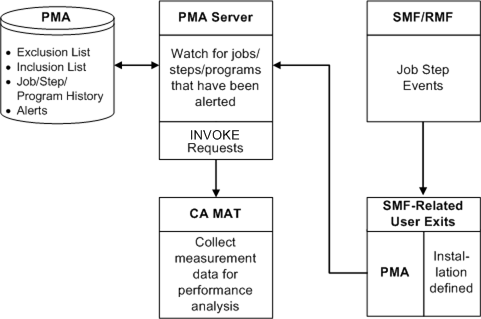
The Server obtains the information about alerted job steps with STATE=PEND. Using this information, the Server reacts to the following scenarios:
The following benefits are realized when the Server is used:
In the event that more than one MVS machine is connected through JES Complex, it is not known on which machine a submitted job runs because this decision is managed by JES. So, if a measurement is desired, a common practice is to issue a measurement request on each machine. Because the Server is also on each machine, it knows which job steps to monitor and it knows which machine. Therefore, the Server issues a measurement request on the MVS machine on which the job step is running.
The Server is intended to run 24 hours a day, 7 days a week. There are two refresh intervals:
The alert refresh interval, by default, is every hour. The alert refresh is critical if user alerts are to be monitored.
The runtime interval refresh, by default, is every 24 hours. The runtime interval refresh simulates the stopping and restarting of the Server in order to reset internal counts and controls.
These refresh times can be changed.
|
Copyright © 2012 CA Technologies.
All rights reserved.
|
|