This section contains the following topics:
SMFDZA - SMF Daily zAAP CPU Use and Demand
SMFDZI - SMF Daily zIIP CPU Use and Demand
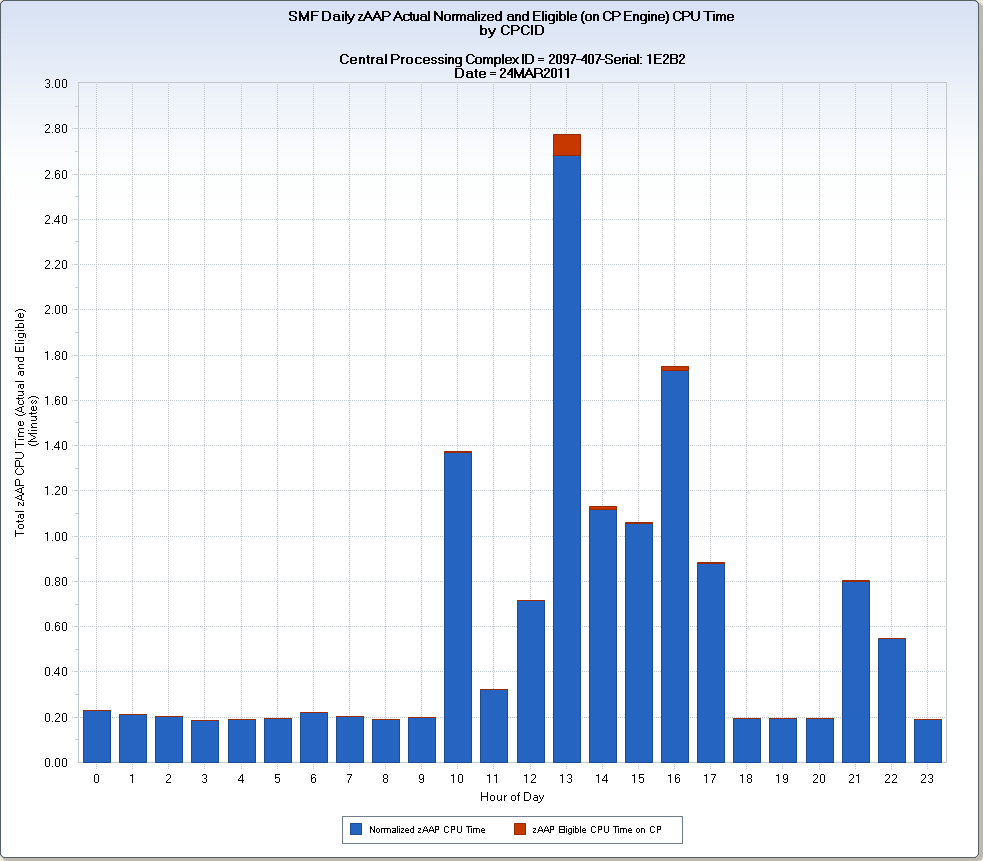
The SMFDZA query charts the hourly actual zAAP engine use per day, and eligible use, for both the Central Processing Complex (CPC) and the z/OS LPARs. In addition, the query shows zAAP engine actual and eligible use by address space type (batch, TSO, started tasks, and so on).
The examples show CPC level zAAP engine demand for an IBM z/10 2097-407.
The first chart shows the total hourly zAAP engine CPU time demand with actual zAAP engine use (blue) and eligible (red) using stacked vertical bars. The peak zAAP engine demand occurred during hour 13. At that hour, 2.68 hours of normalized zAAP engine CPU time were used. The normalization of zAAP CPU time is important for this CPC model because the CP engines run slower than the specialty (zIIP/zAAP) engines. When zIIP or zAAP CPU time is normalized, the value is expressed as the CP engine equivalent by multiplying by a normalization factor. For the 2097-407 CPC model, the normalization factor is 4.210938.
The second chart shows the actual zAAP CPU time use, broken down by address space type. All zAAP engine demand on the CPC shown came from started task address spaces. The second Q&R view for the address space level chart would show the breakdown for any eligible zAAP CPU time that executed on CP engines.
This query is used to determine if the zAAP engines in a CPC are sufficient to handle the zAAP eligible workload running on z/OS LPARs. The query also shows you what address space types in your workload mix execute zAAP engine eligible code. Even if no zAAP engines are present in a CPC, the charts show z/OS LPAR zAAP eligible work that executed on CP engines. zAAP engines are less expensive that CP engines. Reducing CP engines in a CPC can reduce software licensing fees. In general, if significant zAAP eligible work is executing on CP engines, it is cost effective to add zAAP engines to the CPC.
Note: If a CPC has one or more zIIP engines and no zAAP engines, and has specified ZAAPZIIP=YES in SYS1.PARMLIB, zIIP engines process all specialty engine work—including work that would normally run on zAAP engines. In this environment, all SMF and RMF metrics treat zAAP and zIIP eligible workloads as zIIP eligible. No zAAP actual or eligible demand appears.
SMF Daily zAAP CPU Use and Demand Adrtyp
VIEW 1 – SMF Daily Actual Normalized zAAP CPU Time Used
PGMZPNTM – Normalized zAAP CPU Time
HOUR – Hour of Day
VIEW 2 – SMF Daily Eligible zAAP CPU Time Executed on CP Engines
PGMZACTM – zAAP Eligible CPU Time on a CP
HOUR – Hour of Day
Note: The two chart thumbnails for VIEW 2 are related to the thumbnails for VIEW 1. While the zAAP Eligible CPU Time on a CP values are much smaller than those values shown in VIEW 1, the vertical bar heights are similar because the Y-axis scale used for VIEW 1 shows hours of CPU time and VIEW 2 shows minutes.
SMF Daily zAAP CPU Use and Demand CPCID
PGMZPNTM – Normalized zAAP CPU Time
PGMZACTM – zAAP Eligible CPU Time on a CP
HOUR – Hour of Day
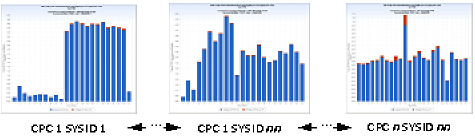
SMF Daily zAAP CPU Use and Demand SYSID
TRIM(LPCMOD)||'-'||TRIM(CPCMODID)||'-Serial: '||SUBSTR(CPCSEQNB,12,5);
DATEPART(ENDTS) ;
IF PGMTYPE=1 THEN ADDRTYP='Batch' ;
ELSE IF PGMTYPE=2 THEN ADDRTYP='TSO' ;
ELSE IF PGMTYPE=3 THEN ADDRTYP='Started Task' ;
ELSE IF PGMTYPE=4 THEN ADDRTYP='APPC' ;
ELSE IF PGMTYPE=5 THEN ADDRTYP='Unix SysSrv' ;
ELSE IF PGMTYPE=6 THEN ADDRTYP='System Addr' ;
ELSE ADDRTYP= 'UNKNOWN' ;
The following modifications can be made to the SMFDZA query:
Note: The query step shows a red X next to the Key Selection task of the Concatenation step. You can ignore the validation error—keys are not required because the six temporary files are not interleaved.
| Copyright © 2011 CA. All rights reserved. | Email CA Technologies about this topic |